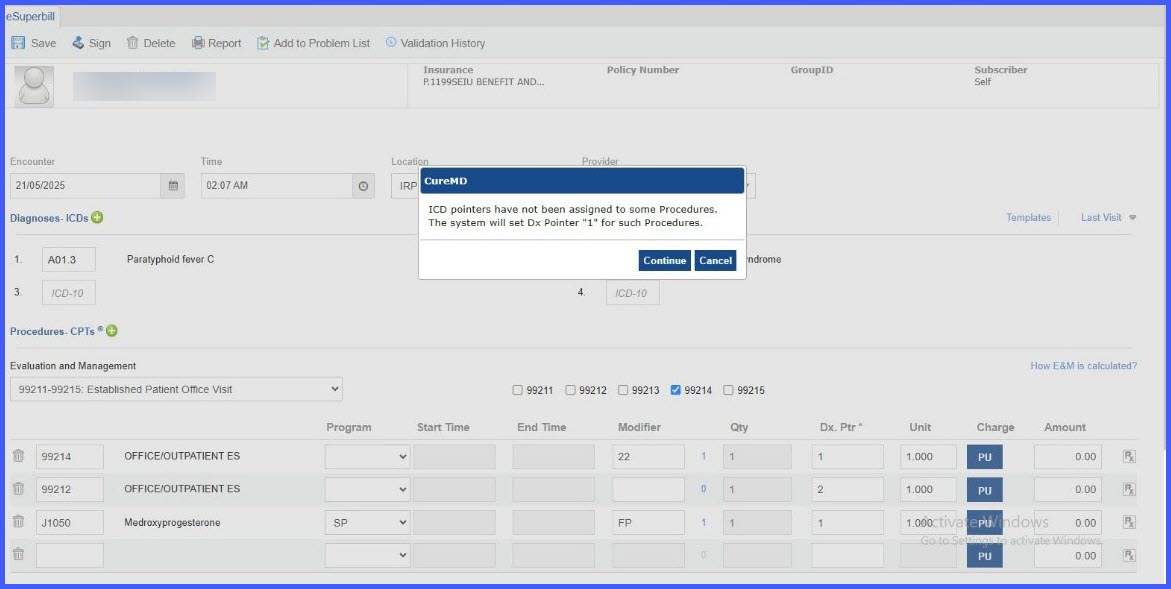
eSuperbill: Warning for Missing Dx Pointers
What’s New
We’ve added a smart reminder to help ensure all your billed procedures are properly linked to diagnoses—reducing denials and saving time on rework.
Prerequisite (one-time setting):
Go to Settings → My Practice Settings → Billing and check “Notify users for Missing ICD Pointers.”
While creating an eSuperbill:
- Add more than one ICD to the visit.
- If at least one CPT has no Dx pointer and you click Save or Save & Sign, a warning appears:“ICD pointers have not been assigned to some Procedures. The system will set Dx Pointer ‘1’ for such Procedures.”
[Continue] [Cancel] - Click Continue to proceed (the system assigns Dx Pointer “1” to only those CPTs missing a pointer).
Click Cancel to go back and manually assign pointers.
Functionality Overview
- When it shows:
- The notification setting is ON, and
- You’ve added more than one ICD, and
- At least one CPT lacks a Dx pointer.
- What it does:
- Does not change any CPTs that already have pointers.
- Assigns “1” only to CPTs missing a pointer when you choose Continue.
- When it won’t show:
- Notification setting is OFF, or
- Only one ICD is on the superbill, or
- All CPTs already have pointers.
- Why this helps:
- Ensures every billed procedure references a diagnosis, reducing avoidable denials and rework.