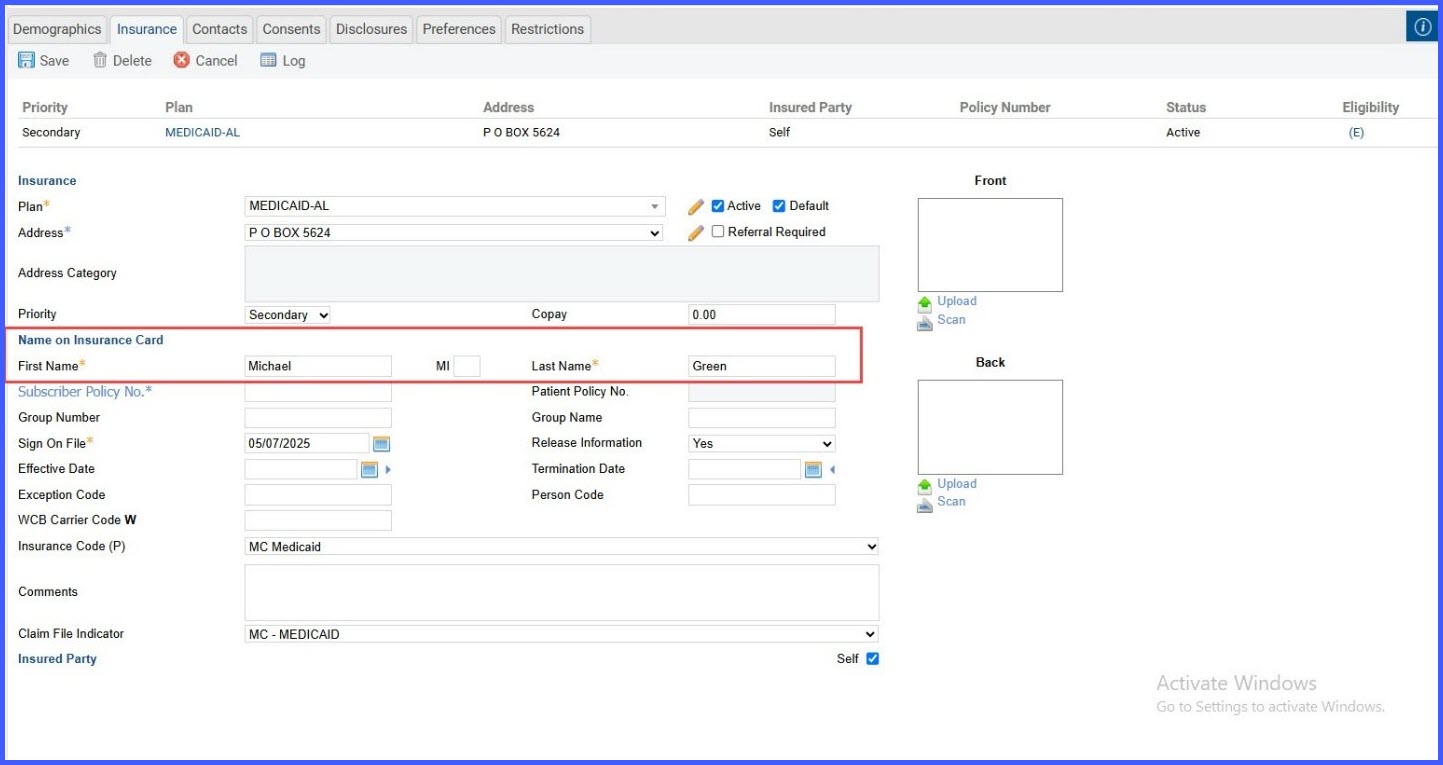
Editable “Name on Insurance Card” for Each Insurance Profile
What’s New?
When the “Insured Party as Self” checkbox is selected:
🔹 A new section titled “Name on Insurance Card” appears
🔹 It includes First Name, Middle Name, and Last Name fields
🔹 Fields are editable and default to the patient’s demographic name
🔹 All edits are logged with date, time, and username
How This Benefits You
✅ Fewer Claim Issues – Ensure the name used matches the insurance card exactly
✅ Faster Reimbursements – Avoid unnecessary claim denials or delays
✅ Clear Audit Trail – All edits are tracked for compliance and review
✅ More Control – Set the correct billable name per insurance entry, as needed
How It Works
1️⃣ Go to the patient’s Insurance Profile
2️⃣ Tick the checkbox for “Insured Pary as Self”
3️⃣ Edit the name fields under “Name on Insurance Card”
4️⃣ Save changes — they’ll be logged and used for billing and eligibility.
This enhancement helps your practice maintain billing accuracy, reduce claim rejections, and stay audit-ready — all while giving you more flexibility in managing patient insurance data.