Permission-Based Access to Charges, Payments, and Encounter Forms from Denials
Denials – Billing Problem List
Denials – Patient Billing Problem List
Access Charges
Access Payments
Access Encounter Form
What’s New
- Enhanced DoS navigation within the Denials bucket of the Problem List.
- Users can now access three workflows directly from the DoS:
-
Add/Edit Charges – Opens the corresponding Charges page.
-
Post Payments – Opens the Payments page.
-
Encounter Form – Opens the corresponding Encounter Form.
• All destination pages open in a new browser tab.
• Navigation options are displayed according to the logged-in user’s permissions.
• When multiple options are available, the system displays a menu containing only the permitted actions.
• When only one option is available, selecting the DoS opens that page directly without displaying a menu.
• When the user has no applicable permissions, the DoS is not clickable.
• The enhancement is available in both Billing and Patient Billing Problem List workflows.
• Existing DoS navigation behavior remains unchanged when the feature is disabled.
-
How It Works
-
Navigate to Billing > Problem List or Patient > Billing > Problem List.
-
Open the Denials bucket.
-
Locate the applicable claim and its Date of Service.
-
Click the DoS.
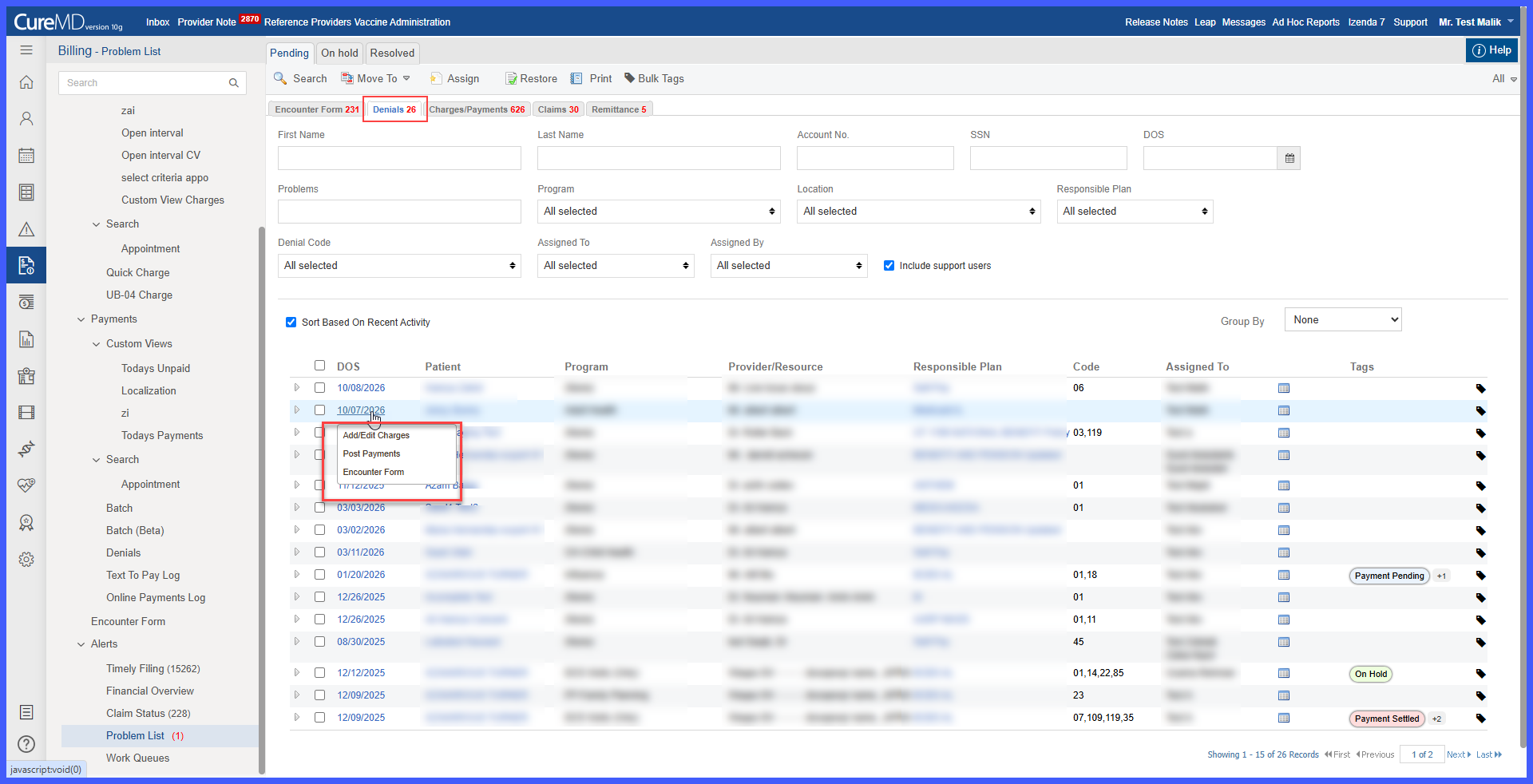
- CureMD evaluates the user’s assigned permissions.
-
If multiple navigation options are permitted, a menu displays the available actions.
-
Select Add/Edit Charges, Post Payments, or Encounter Form.
-
The selected page opens in a new browser tab.
Benefits
- Reduces navigation steps when accessing encounter-related billing and clinical information.
- Allows billing staff to review Charges, Payments, and Encounter Forms directly from the Denials workflow.
- Supports faster denial investigation by providing convenient access to related information.
- Ensures users see only navigation options permitted by their assigned access rights.
- Simplifies navigation by opening the destination directly when only one option is available.
- Provides consistent DoS navigation across both supported Problem List workflows.
- Preserves existing navigation behavior for practices where the enhancement is not enabled.
