Rx Hub Quick Link with Pending Request Count
What’s New
- Added a dedicated Rx Hub icon to the 11x EHR top toolbar.
- Hovering over the icon displays the tooltip “Rx Hub.”
- The new icon does not change the order, spacing, or behavior of existing toolbar items.
- The quick link displays a consolidated count of all applicable pending Rx Hub requests, including:
- Refill requests
- Change requests
- PAN request
- The displayed count represents the combined pending total and is not limited to a specific request type.
- When no applicable pending requests exist, the Rx Hub icon remains available without a count indicator.
- Selecting the quick link opens Rx Hub directly on the Requests tab.
- No request-type filter is applied when Rx Hub is opened from the quick link.
- All applicable pending request types are therefore available for review upon entry.
- Entry through the top toolbar and existing left tree menu follows the same unfiltered behavior.
How It Works
- Log in to the 11x EHR with the applicable Rx Hub/e-prescribing permission.
- Locate the Rx Hub icon in the top toolbar.
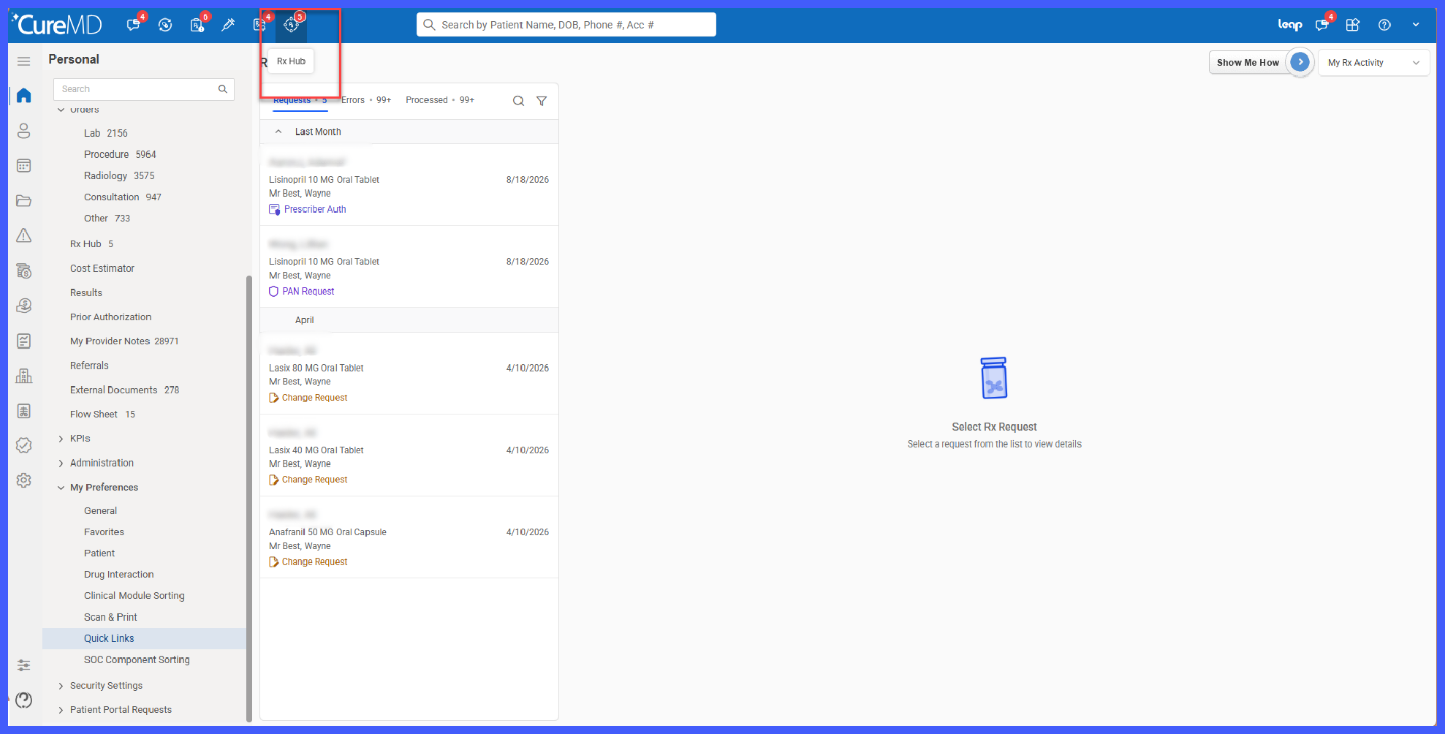
- Review the displayed count to see the total number of applicable pending Rx Hub requests.
- Select the Rx Hub icon.
- Rx Hub opens directly on the Requests tab with no request-type filter applied.
- Review and process applicable refill, change, and PAN requests using the existing Rx Hub workflow.
- As requests are added or processed, the displayed count is updated during the next top-navigation auto-refresh cycle
Permission-Based Visibility
- The existing Rx Hub/e-prescribing permission controls access to the quick link.
- No new permission has been introduced.
- Users without the applicable permission do not see the Rx Hub quick link.
- The pending request count is not retrieved for users who do not have the applicable permission.
Existing Rx Hub Functionality
The enhancement introduces a new entry point and consolidated pending count without changing existing Rx Hub processing functionality.
Whether Rx Hub is opened from the top toolbar or left tree menu, the following continue to operate according to the existing workflow:
- Requests, Errors, and Processed tabs
- Search
- Sort
- Grouping
- Request details and actions
- Existing request processing behavior
Benefits
- Gives providers direct access to Rx Hub from the top toolbar.
- Reduces navigation by eliminating the need to expand the left tree menu to access pending prescription requests.
- Provides an at-a-glance view of the provider’s total applicable pending Rx Hub workload.
- Consolidates refill, change, and PAN requests into a single pending count.
- Opens Rx Hub without a default request-type filter, allowing all applicable pending requests to be reviewed together.
- Maintains existing Rx Hub workflows so providers do not need to learn a new request-processing process.
