Prenatal Flow Sheet Usability Enhancements
Prenatal Documentation
Enter Pain and Edema
Print or Fax Prenatal Flow Sheet
What’s New
- Standard OB abbreviations are now used for selected on-screen column headers:
- SFH – Fundal Height (cm)
- FM – Fetal Movement
- Pres. – Presentation
- PTL Sx – Preterm Symptoms
- B/S – Bishop Score
- Wt. – Weight (lbs)
- Cervix-related fields are grouped beneath a Cx parent header:
- Dil
- Eff
- Sta
- Con
- Pos
- Urine-related fields are grouped beneath a Urine parent header:
- Alb
- Glu
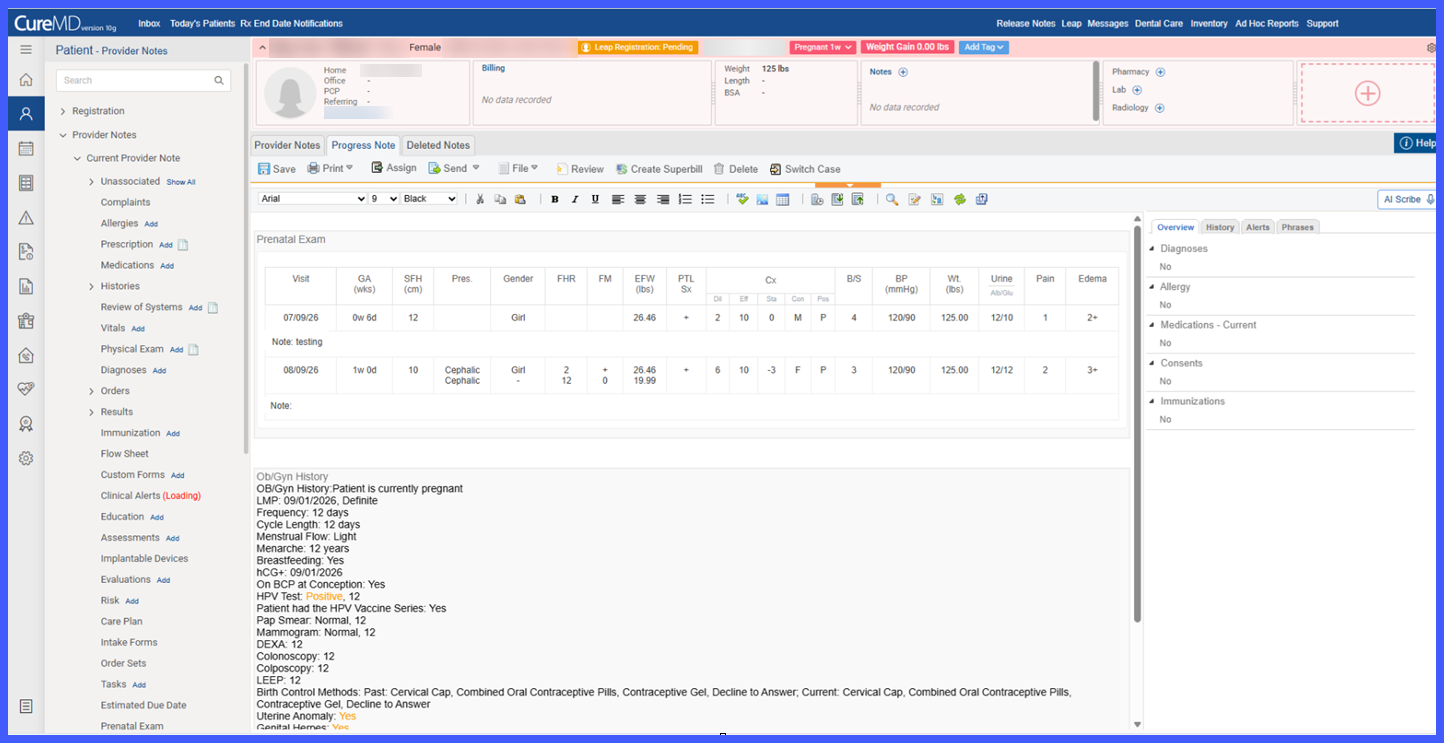

- Hovering over abbreviated, grouped, or sub-field headers displays the complete field name.
- A new Pain column appears immediately after Wt.
- A new Edema column appears immediately after Pain.
- Pain and Edema can be entered during note documentation and are retained when the note is saved.
- On-screen visit dates now display in MM/DD/YY format.
- Existing and newly documented visit rows use the updated on-screen date presentation.
- The underlying field names, clinical values, and stored dates remain unchanged.
How It Works
- Open a Progress Note or Provider Note containing the Prenatal Flow Sheet.
- The flow sheet displays the updated abbreviated and grouped column headers to provide a more compact on-screen layout.
- Hover over an abbreviated or grouped header to view its complete field name.
- Enter Pain and Edema information alongside the existing prenatal visit information when applicable.
- Save the note to retain the entered Pain and Edema values within the visit row.
- Print or fax the Prenatal Flow Sheet when the complete clinical record is required.
Benefits
- Reduces horizontal scrolling by presenting commonly used OB terminology in a more compact format.
- Uses familiar obstetric abbreviations to make the flow sheet easier for providers to scan during prenatal encounters.
- Groups related Cervix and Urine information for easier review.
- Adds dedicated Pain and Edema fields so these findings can be documented and trended alongside other prenatal information.
- Provides full field names through tooltips without requiring additional screen space.
- Preserves complete, unabbreviated information in printed and faxed records.
- Ensures off-screen information is included when prenatal documentation is printed or faxed.
