Extended Multiple View with Page Navigation for Enterprise Scheduling
Access Extended Multiple View
Navigate Provider and Resource Calendars
Change Scheduler Date
Manage Appointments
What’s New
- A new Extended Multiple View is available for enterprise scheduling.
- An unlimited number of provider and resource calendars can be included and organized into pages of up to five calendars each.
- Previous and Next controls allow users to navigate between calendar pages.
- A page indicator displays the current page and total number of pages, such as 1 of 3.
- Saved Views provide predefined groups of provider and resource calendars.
- The selected Saved View is remembered for each user across sessions.
- Today and Jump To update the date across all calendars displayed on the current page.
- Existing Multiple View functionality remains available, including:
– Appointment booking
– Drag-and-drop scheduling
– Appointment status updates
– Printing
– Appointment tooltips - Practices without Extended Multiple View enabled continue using the existing Multiple View without workflow changes.
- The feature is enabled at the practice level through backend configuration.
- Saved Views are created and maintained by Support/L3 and are read-only for end users.
How It Works
- Navigate to Scheduler > Multiple View and access Extended Multiple View.
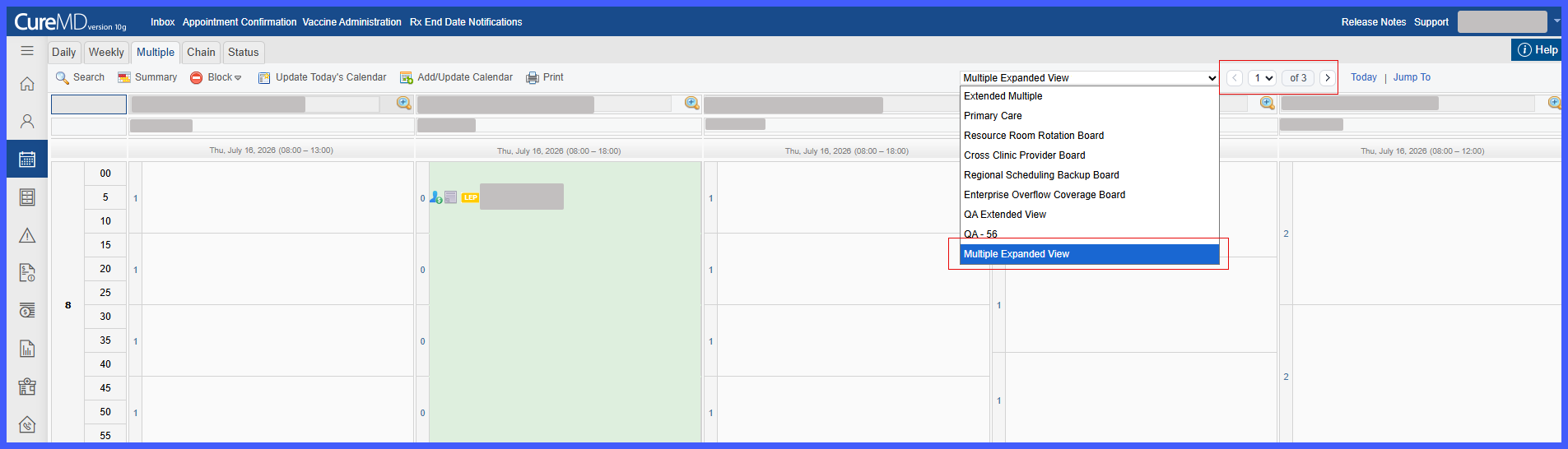
- Select an available Saved View containing the configured provider and resource calendars.
- The system displays up to five calendars on the first page according to the order defined in the Saved View.
- If the Saved View contains more than five calendars, additional calendars are automatically organized into subsequent pages.
- Use Previous and Next to move between pages. The page selector identifies the current and total number of pages.
- Use Today or Jump To to update the date for all calendars displayed on the current page.
- Continue using existing scheduling actions, including appointment booking, drag-and-drop, status updates, printing, and appointment tooltips.
- The selected Saved View is remembered for the user and automatically retained across sessions.
Impacted Areas
- Scheduler – Multiple View
- Saved View
- User Preferences (Scheduler)
Benefits
- Provides greater visibility across large groups of provider and resource schedules.
- Eliminates the previous five-calendar limitation by organizing calendars across multiple pages.
- Allows faster navigation between large numbers of providers and resources.
- Improves organization through reusable, predefined Saved Views.
- Reduces manual effort when managing enterprise-scale scheduling operations.
- Preserves familiar Multiple View workflows, minimizing the need for user retraining.
- Remembers each user’s selected Saved View across sessions.
