Validate Policy Number and Automatically Select the Next Available Eligibility Search Criteria
Configure Eligibility Search Criteria
Automatic Eligibility Validation
Manual Eligibility Inquiry
What’s New
- Automatic eligibility workflows now evaluate configured search criteria in priority order.
- Search criteria with missing required information are automatically skipped.
- The first valid search criteria is used to submit the eligibility inquiry.
- Only one eligibility inquiry is submitted per workflow event.
- If no valid search criteria are available, no inquiry is triggered.
- Manual eligibility inquiries now validate required patient and insurance information before submission.
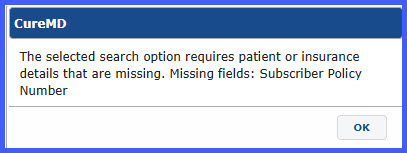
- Users receive a validation message listing all missing required fields when an inquiry cannot be processed.
- When no plan-specific search criteria are configured, the system automatically uses the Default search criteria.
How It Works
- Configure one or more eligibility search criteria for an insurance plan.
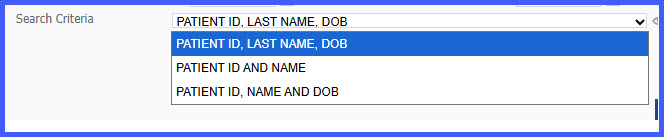
- During an automatic eligibility workflow, the system evaluates each configured search criteria in priority order.
- Criteria missing required patient or insurance information are skipped automatically.
- The first valid search criteria is used to submit the eligibility inquiry.
- If no valid criteria are available, the inquiry is not submitted.
- For manual eligibility inquiries, select a search criteria from the available options.
- If required information is missing, the system displays a validation message identifying the missing fields.
- If no plan-specific search criteria exist, the system uses the Default search criteria.
Benefits
- Automatically selects the first valid eligibility search criteria without user intervention.
- Reduces failed eligibility inquiries caused by missing required information.
- Eliminates unnecessary eligibility requests by submitting only one inquiry per workflow.
- Provides clear validation messages to help users resolve missing information quickly.
- Improves eligibility processing reliability across automatic and manual workflows.
