Patient > Clinical > Results > Select Result > Do Not Share Result > Select Reason
Patient > Clinical > Results > Share Result > Confirm Action
Settings > Billing > Procedure > Edit Procedure
Administration > Logs / Audit Trail
What’s New
- Simplified labels in the Withhold Result section:
– “Select Exception” is now Reason
– “Specify Clinical Justification” is now Clinical Justification
- Improved tooltip guidance explaining when and why results can be withheld
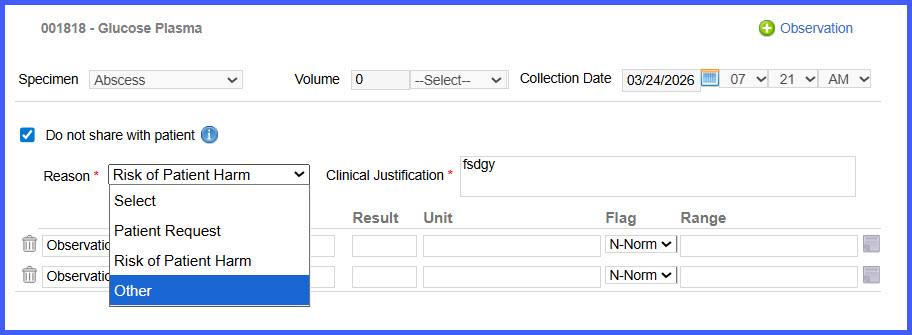
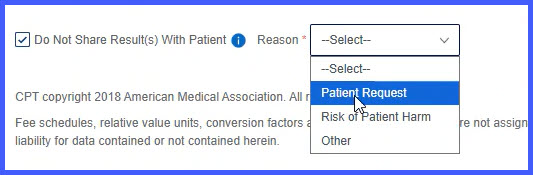
- Structured reason selection when withholding results
- “Other” option requires mandatory Clinical Justification (up to 1000 characters)
- Confirmation message displayed when results are shared in Beta view
- Additional confirmation prompt when sharing previously withheld results
System logs now track result sharing actions (enable/disable) with:
– User details
– Date and timestamp
- Consistent behavior across Results, Orders, Patient, Personal, Administration, and Settings workflows
How It Works
- Navigate to a workflow where results can be shared or withheld.
- Select Do not share result with patient (if applicable).
- Choose a Reason from the dropdown.
- If Other is selected:
• A Clinical Justification field appears
• Enter justification (up to 1000 characters) before proceeding
- Tooltip guidance provides additional clarity on withholding rules and compliance requirements.
- When sharing results:
• A confirmation message appears in Beta view
• If the result was previously withheld, an additional confirmation prompt ensures the action is intentional
- The system logs all result sharing actions, including enabling or disabling sharing, along with user and timestamp details.
Benefits
- Improves clarity and usability of result sharing controls
- Ensures proper documentation when withholding results
- Supports compliance with the 21st Century Cures Act
- Reduces risk of incorrect result sharing or withholding
- Enhances audit visibility with detailed logging
- Provides a consistent experience across all related workflows
