Patient > Clinical > Immunization > Generate Report
What’s New
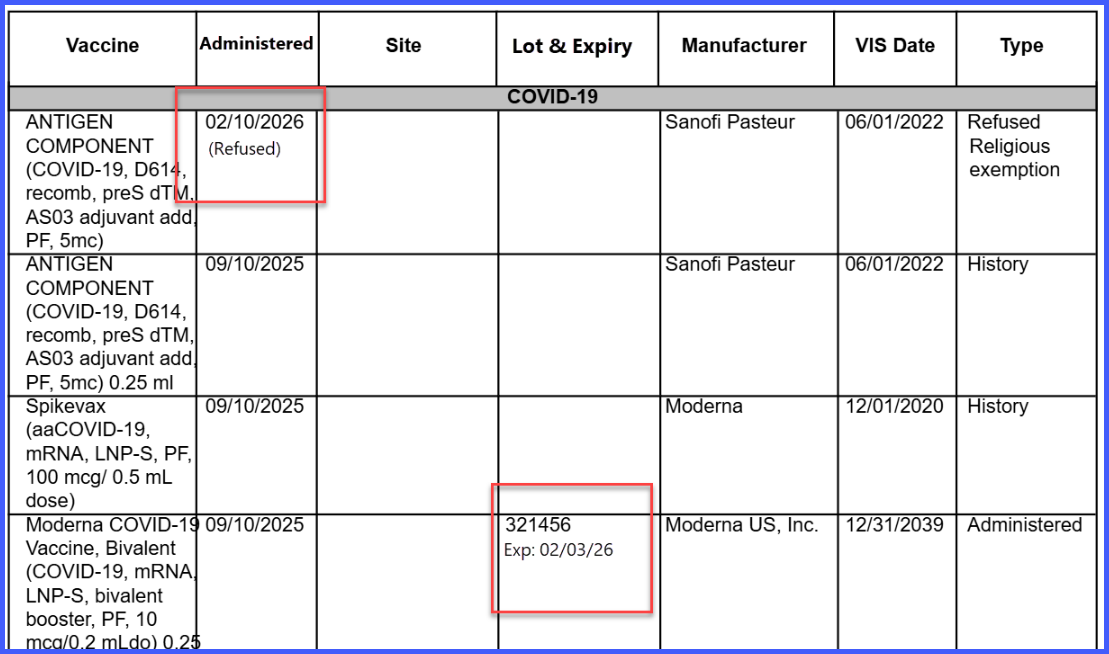
- The Date column is renamed to Administered
- The Lot & Expiry column is replaced with Lot Expiry Date
- Lot expiry values are displayed for each vaccine entry when available
- The expiry field remains blank if no expiry information exists
- Refused vaccines display a clear indicator alongside the administered date
- Changes apply consistently across all immunization reports (adult and child)
How It Works
- Navigate to the Immunization module.
- Generate the Immunization Report.
- Review updated column headers:
• Administered – Displays the vaccine administration date
• Lot Expiry Date – Displays the expiry date for the vaccine lot
- For refused vaccine entries:
• The Administered column displays the date with the label “(Refusal)”
- If no expiry information is available:
• The Lot Expiry Date field remains blank
Benefits
- Improves clarity of immunization data with updated column labels
- Ensures consistent display of administered and expiry information
- Provides clear identification of refused vaccines
- Enhances usability without requiring any user configuration
- Supports better clinical review and documentation of immunization records
