New Scheduler Setting to Enforce Mandatory Cancellation Reasons
What’s New
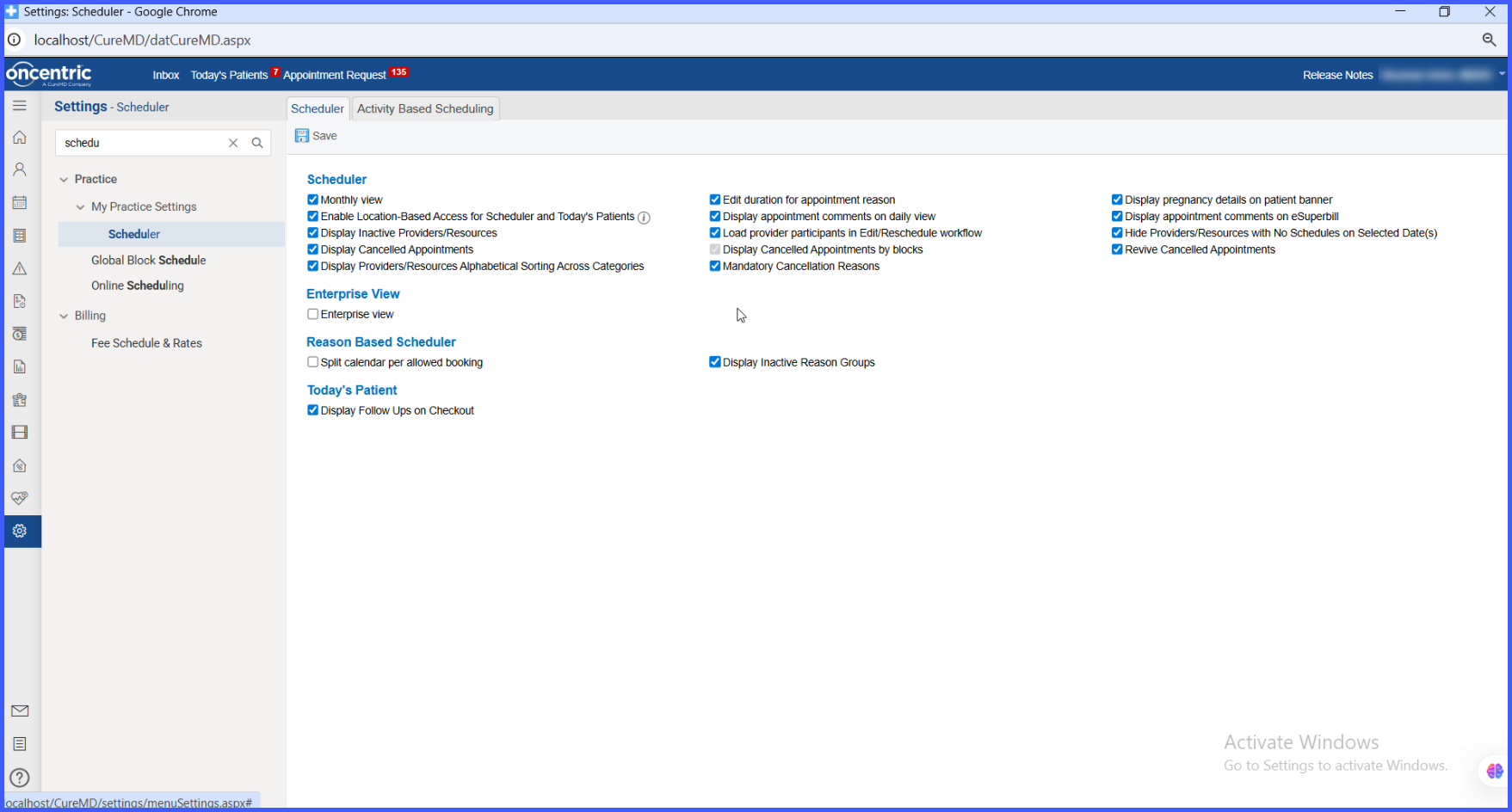
- A new setting “Mandatory Cancellation Reasons” is available under Scheduler settings
- Users must select a cancellation reason before canceling an appointment when enabled
- A popup prompts users to choose a reason before proceeding
- Cancellation is blocked until a valid reason is selected
- When disabled, cancellation reasons remain optional (existing behavior retained)
- The setting is disabled by default for all practices, except the requesting practice
How It Works
-
Navigate to My Practice Settings > Scheduler.
-
Enable the Mandatory Cancellation Reasons setting.
-
When a user attempts to cancel an appointment:
• A popup appears prompting: “Select Cancel Reason”
• The user must choose a valid reason from the available options
- The system prevents cancellation until a reason is selected
- Once selected, the appointment is successfully canceled and the reason is recorded
If the setting is disabled:
- Users can cancel appointments without selecting a reason
- The existing workflow remains unchanged
Benefits
- Ensures complete and consistent documentation of appointment cancellations
- Improves reporting accuracy and trend analysis
- Supports audit and compliance requirements
- Reduces gaps in cancellation tracking
- Enhances operational visibility into appointment management
