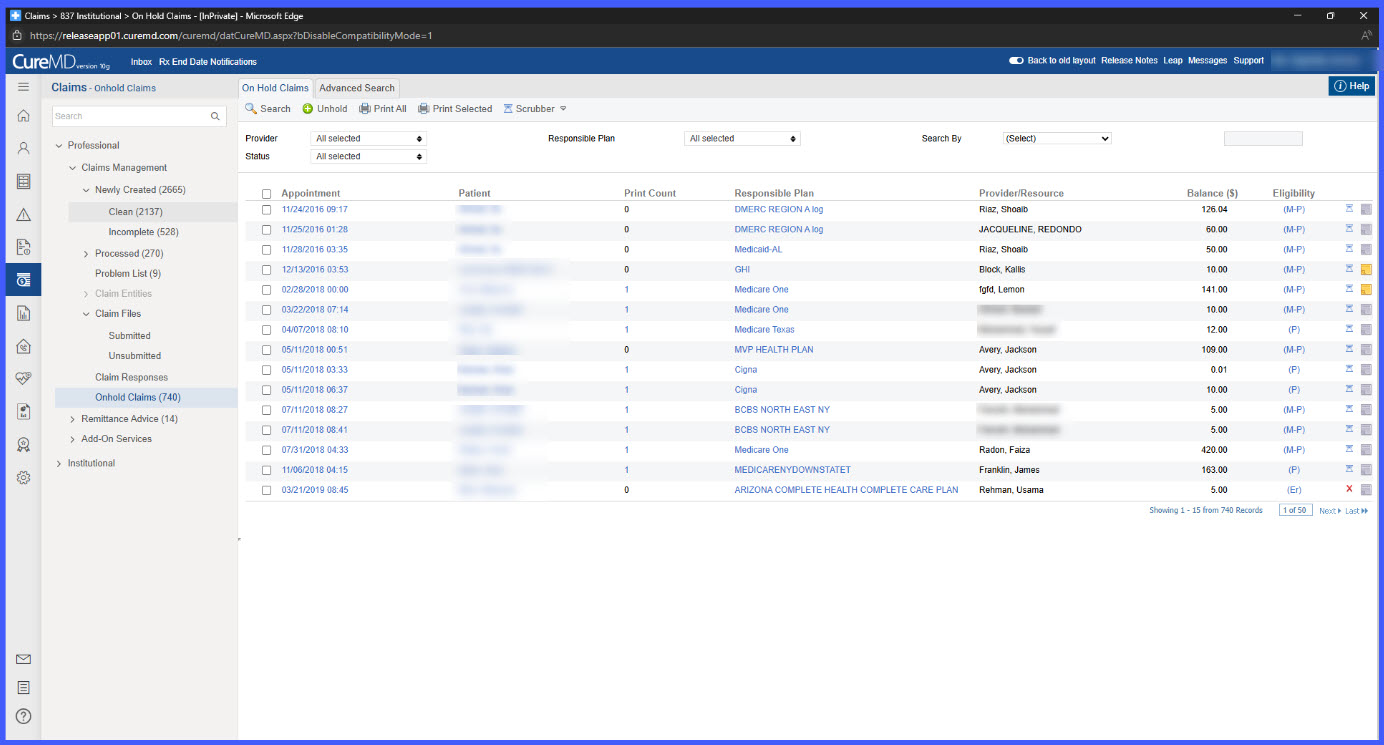
Sort and Search Claims: RCM > On-Hold Bucket > Sort Columns / Search by CMDID
Navigate to Related Records: RCM > On-Hold Bucket > Click DOS / Patient Name / Responsible Plan
Filter by Status: RCM > On-Hold Bucket > Select Status from Dropdown
What’s New
- Sorting enabled across all columns in the On-Hold bucket
- CMDID (Claim Identifier) added to search criteria
- Key columns now include direct navigation hyperlinks
- Status dropdown displays real-time claim counts
- One-click filtering available through status selection
- All features respect role-based access controls
How It Works
- Navigate to the On-Hold bucket within the claims module.
- Use sorting functionality:
• Click any column header to sort data (alphabetical or numerical)
• Sorting persists within the session
• Resets on page refresh or new sort selection
- Use CMDID search:
• Select CMDID from the “Search By” dropdown
• Enter the Claim Identifier
• The system validates input before executing search
• Invalid or empty values return a user message
- Use direct navigation links:
• Click DOS to open the Charge page
• Click Patient Name to open Patient Demographics
• Click Responsible Plan to open the Insurance page
• Pages open in the same tab
- Use status summary counts:
• Each status shows the number of associated claims
• Click a status to apply a one-click filter
• Counts update dynamically based on real-time data
 Benefits
- Improves efficiency in claim review and follow-up
- Reduces manual filtering and repetitive actions
- Enables faster claim identification using CMDID search
- Provides quick access to related charge, patient, and insurance data
- Enhances visibility with real-time status counts
- Supports better workload prioritization and planning
- Maintains secure access through role-based permissions
