Account and DOS-Based Collection Controls
What’s New
1. Dual-Level Collection Eligibility Configuration
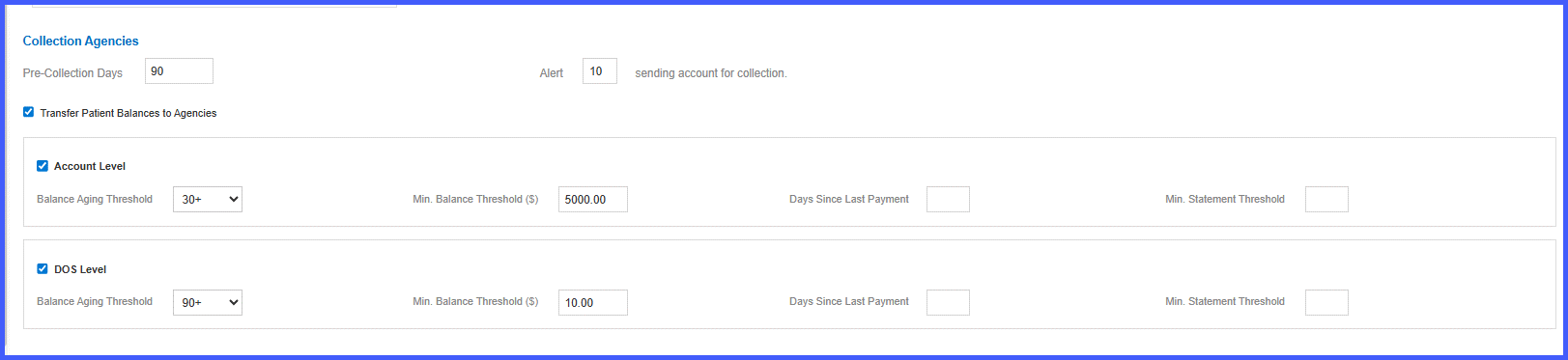
A new configuration allows administrators to select how balances are evaluated for collections:
• Account Level – Evaluates the total outstanding balance across the entire patient account.
• DOS Level – Evaluates balances tied to individual dates of service.
Users may:
• Enable Account Level only
• Enable DOS Level only
• Enable both levels
When the master setting is enabled, at least one level must be selected.
2. Filters Available at Both Levels
Both Account and DOS Levels support the same configurable filters:
• Patient Balance Aging Threshold (based on the date when the balance was transferred to the patient)
– All
– 30+
– 60+
– 90+ (default)
– 120+
• Minimum Balance Threshold ($) – Numeric field
• Days Since Last Payment – Numeric field
• Minimum Statement Threshold – Numeric field
Blank numeric fields are treated as no restriction.
3. Updated “Days Since Last Payment” Logic
The system now evaluates only appointments with actual patient payments greater than zero when applying the Days Since Last Payment filter.
• Appointments with write-offs only (no patient payment) are no longer considered valid payment activity for this calculation.
4. Independent Evaluation Logic
When both Account Level and DOS Level are enabled:
• Each level is evaluated independently.
• Balances meeting all configured criteria at either level are eligible for collections.
System Behavior & Rules
Master Dependency
If “Transfer Patient Balances to Agencies” is disabled:
• Account Level checkbox is disabled
• DOS Level checkbox is disabled
• All related filters are disabled
• No collection eligibility calculations occur
Minimum Selection Validation
When the master setting is enabled:
• At least one level (Account or DOS) must be selected.
• If both are deselected, the system prevents saving and displays:
“At least one level (Account or DOS) must be selected for collection agency settings.”
Default Behavior After Release
For existing customers:
• DOS Level remains enabled (current behavior retained).
• Account Level remains disabled unless explicitly selected.
Numeric Field Validation
• Numeric fields accept valid numeric values only.
• Invalid entries are not permitted.
• Blank values indicate no filter restriction.
UI & Tooltip Enhancement
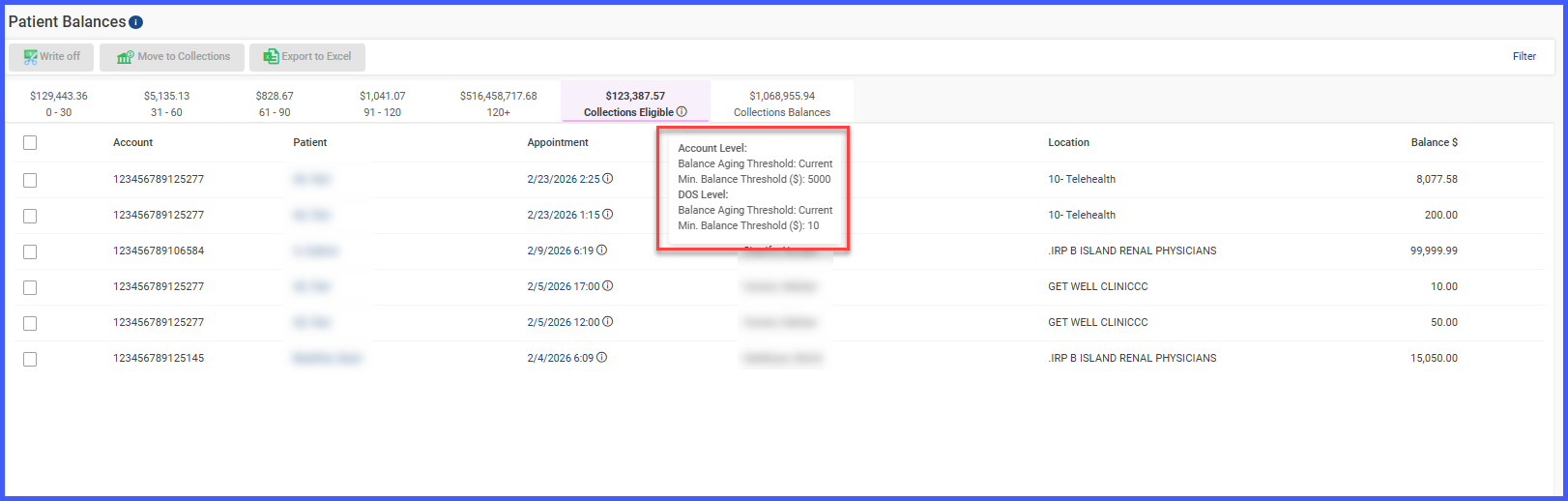
The Collection Eligible Tooltip on the Patient Balance page has been enhanced:
• Previously displayed DOS-level filters only.
• Now dynamically displays active filters from:
– Account Level
– DOS Level
– Or both (if enabled)
Only configured and active filter values are shown.
How It Works
-
Navigate to Settings > Billing > Collection Settings.
-
Enable Transfer Patient Balances to Agencies.
-
Select Account Level, DOS Level, or both.
-
Configure applicable filters at each selected level.
-
Save settings.
-
The system evaluates balances based on configured logic and marks eligible balances accordingly.
 Benefits
-
Greater flexibility in collections strategy
-
Alignment with practice-level financial policies
-
Clearer eligibility logic through improved tooltips
-
Independent evaluation at multiple levels
-
Maintains backward compatibility for existing customers
