Practice-Level Control to Display Specimen Type in Lab Flowsheet
What’s New
-
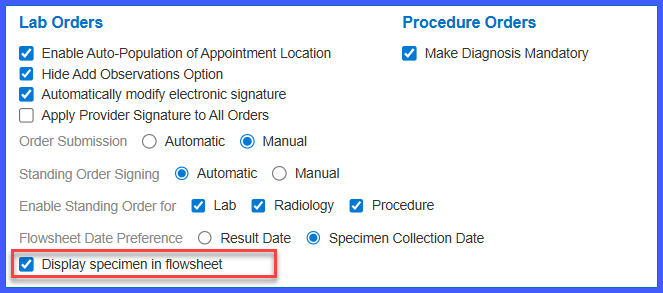
A new checkbox labeled Display specimen in flowsheet is available at the practice level.
-
The setting is located under My Practice Settings > EHR > Lab Orders.
-
The checkbox is unchecked by default.
-
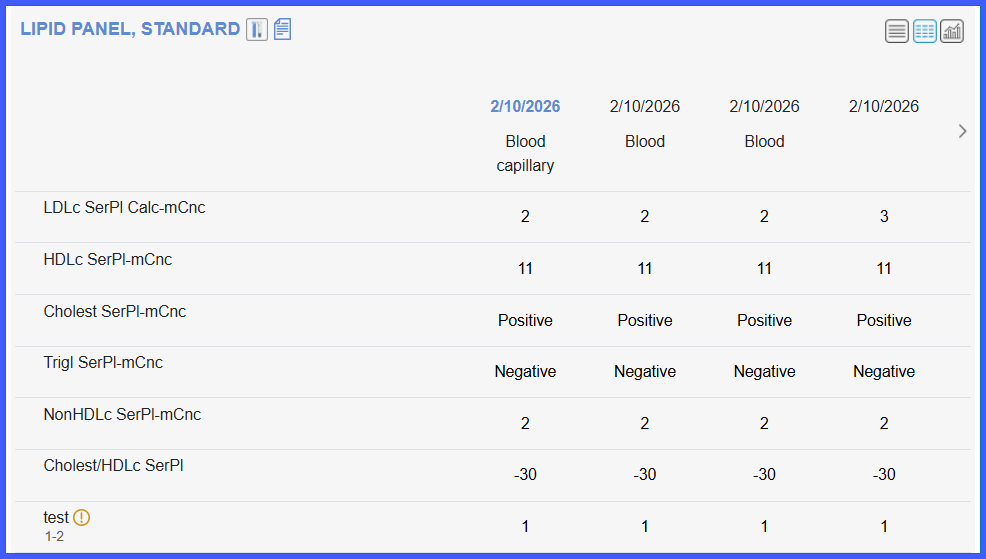
When enabled, specimen type is shown for each lab result in the flowsheet.
-
When disabled, specimen type is hidden from the flowsheet.
-
The setting applies uniformly across supported lab result views.
How It Works
- Navigate to My Practice Settings > EHR > Lab Orders.
-
Leave the checkbox unchecked to hide specimen type in the lab flowsheet.
-
Check the box to display specimen type for lab results.
-
Save the practice settings.
-
The system applies the selected behavior across all applicable lab result workflows.
Benefits
-
Gives practices control over whether specimen details appear in lab result flowsheets.
-
Supports clearer interpretation of lab results when specimen context is required.
-
Keeps flowsheets clean and uncluttered when specimen information is not needed.
-
Ensures consistent display behavior across provider note and lab result views.
