PSC (Patient Service Center) Submission Option Enabled for Northwell Health Orders
What’s New
-
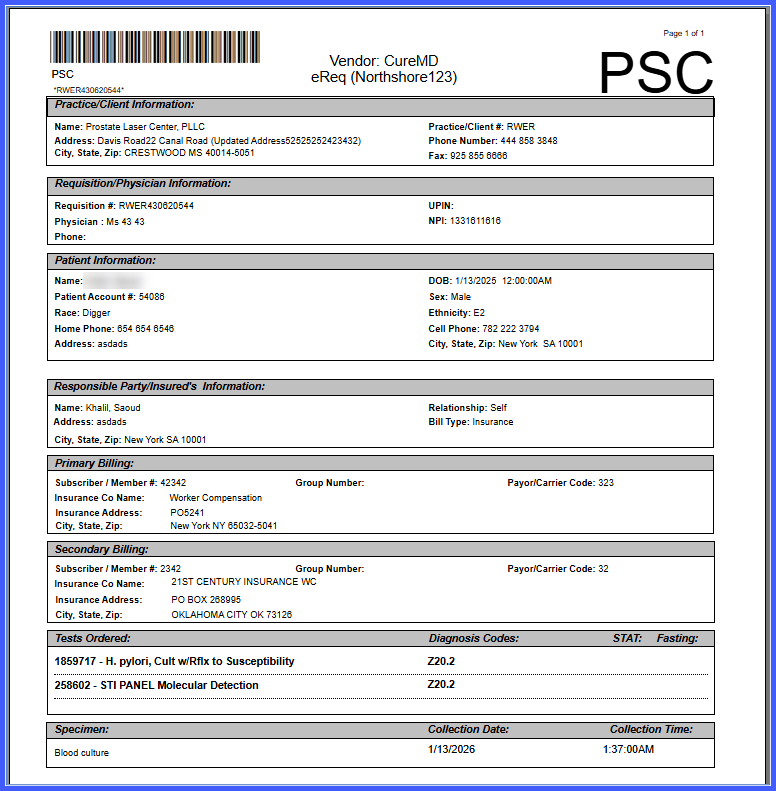
A Submit specimen at service center (PSC) checkbox is available for Northwell Health orders when the Northshore parser is selected.
-
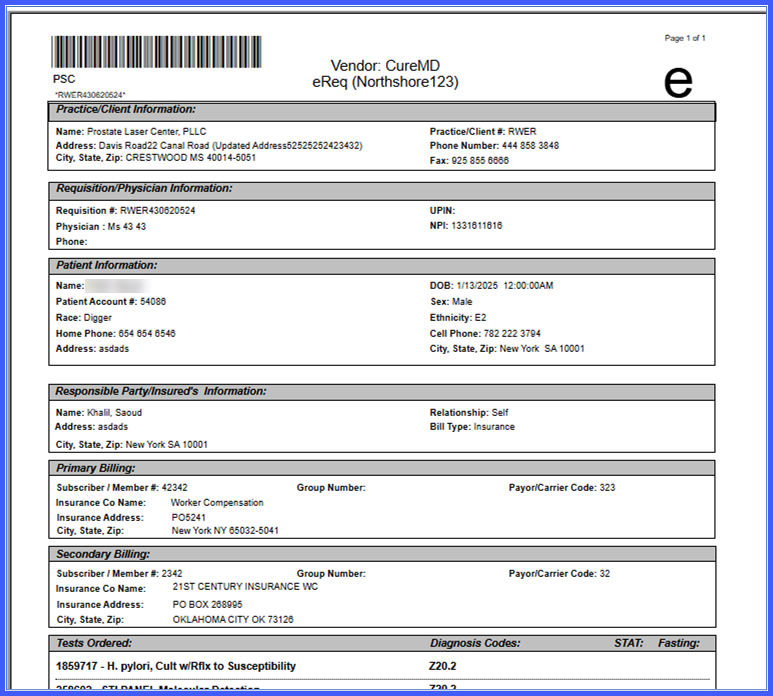
The PSC selection controls how the requisition is displayed.
-
PSC logo appears on the requisition when the checkbox is enabled.
-
A character “e” appears on the requisition when the checkbox is disabled.
-
Behavior is consistent with existing PSC handling for Quest labs.
How It Works
-
Navigate to Settings > Laboratory > Edit Lab.
- Select Northwell Health as the laboratory and ensure the Northshore parser is used.
-
During order entry, locate the Submit specimen at service center (PSC) checkbox.
-
Check the box to indicate the specimen will be submitted at a service center.
-
Leave the box unchecked to indicate a non-PSC submission.
-
Generate the lab requisition.
-
The requisition displays the PSC logo if the checkbox is checked, or the character “e” if unchecked.
Benefits
-
Ensures accurate representation of specimen submission preferences on lab requisitions.
-
Aligns Northwell Health workflows with existing Quest PSC functionality.
-
Reduces ambiguity in requisition handling for laboratory and service center staff.
-
Improves consistency and reliability across laboratory order workflows.
