Show and Store “State of Accident” for Worker’s Compensation When Condition = Employment (EM)
What’s New
-
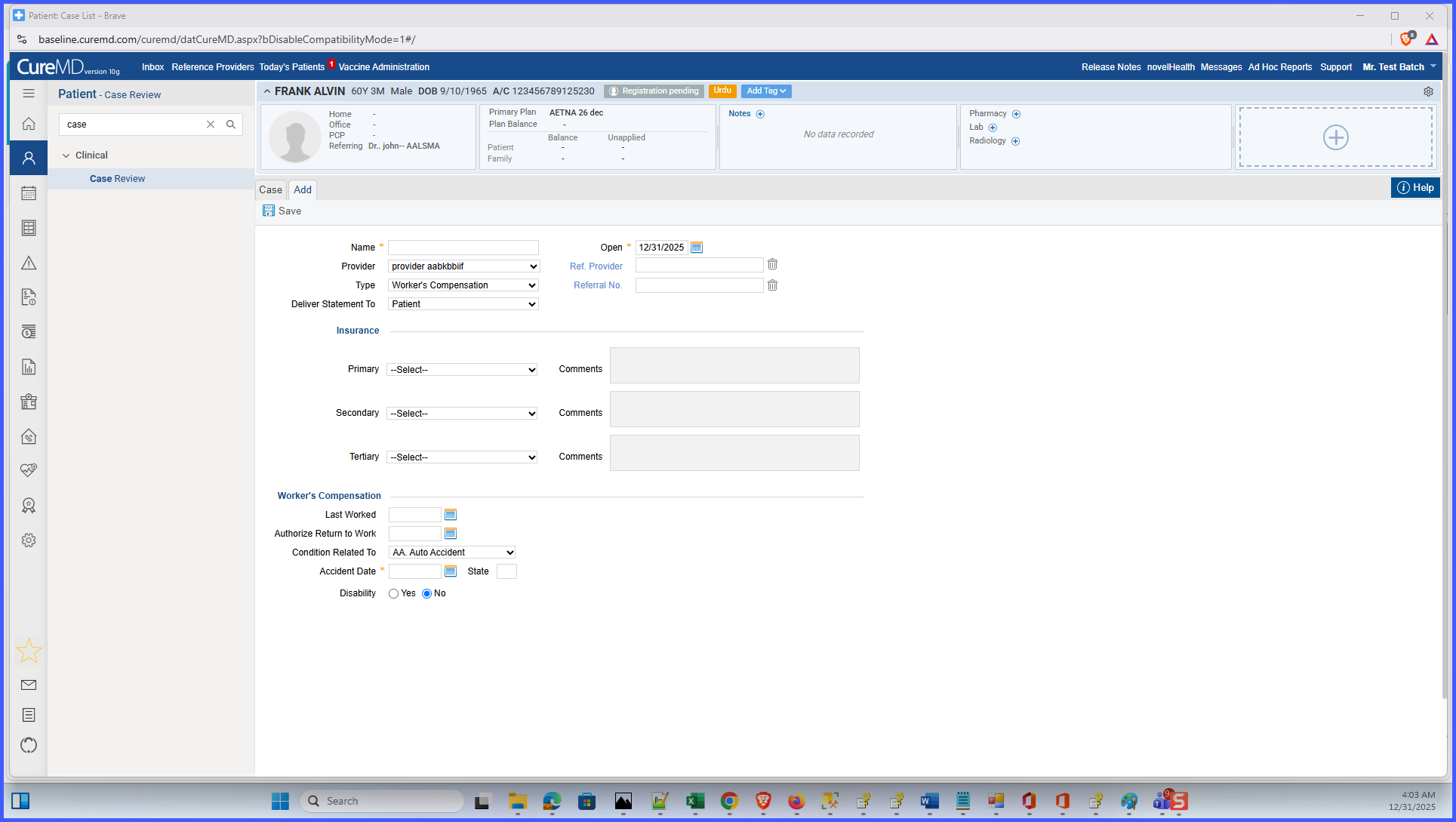
A State of Accident input field is now displayed for applicable Worker’s Compensation cases.
-
The field appears alongside Accident Date when specific conditions are met.
-
The entered State of Accident value is saved with the Case record.
-
The stored value is made available for downstream workflows, including EDI claim generation.
-
UI behavior is aligned with the existing Auto Accident workflow for consistency.
How It Works
-
Navigate to Patient > Clinical > Case Review.
-
Create a new Case or edit an existing Case.
-
Select Type = Worker’s Compensation.
-
Select Condition related to = Employment (EM) or Other Accident (OA).
-
The system displays the State of Accident field next to Accident Date.
-
Enter the applicable state and save the Case.
-
The system stores the value and makes it available for downstream processing.
Benefits
-
Ensures required accident state information is captured for Worker’s Compensation claims.
-
Reduces claim rejections caused by missing State of Accident data.
-
Improves accuracy and completeness of case records.
-
Streamlines staff workflows by prompting for required information at the time of case entry.
-
Supports cleaner downstream EDI submissions, including integrations such as Jopari.
