Granular Permissions for Claims Module
What’s New
-
A Master Claims toggle controls overall visibility of the Claims module.
-
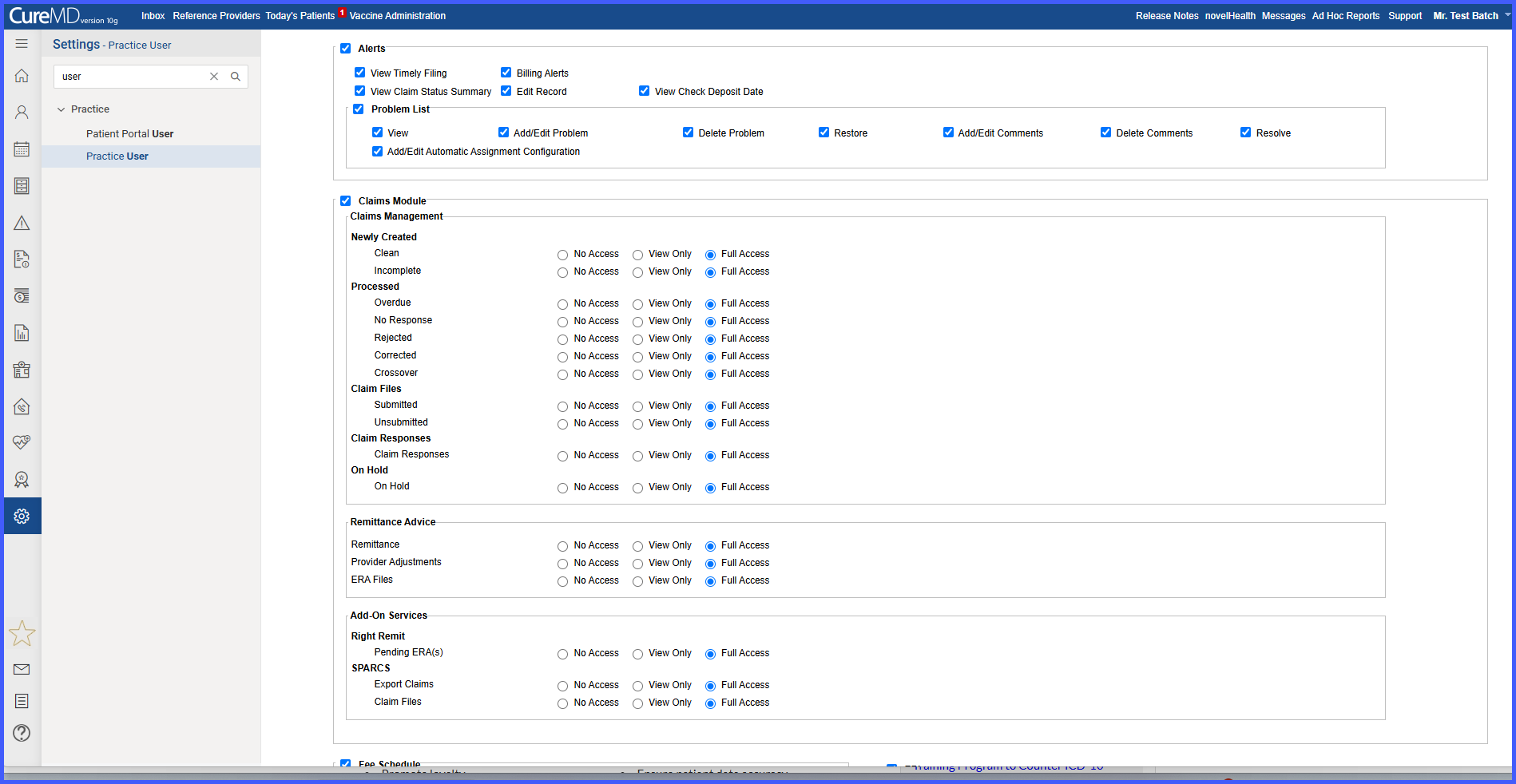
Individual Claims sub-modules now support separate permission settings.
-
Each sub-module can be set to one of three access levels: No Access, View Only, or Full Access.
-
Sub-modules include Claims Management, Claim Files, and Remittance Advice.
-
A Non-Postable warning appears when Full Access is granted for Remittance Advice.
-
Existing automation continues to process Postable claims without interruption.
-
Default permissions preserve existing user access upon deployment.
How It Works
-
Navigate to Settings > Practice > My Practice Settings > Practice User.
-
Enable the Master Claims toggle to make the Claims module available.
-
For each Claims sub-module, select an access level: No Access, View Only, or Full Access.
-
Save the user settings.
-
The system dynamically applies access rules based on the configured permissions.
-
Remittance workflows continue to follow existing automation behavior.
Benefits
-
Limits user access to only the permissions required for their role, reducing unnecessary system access.
- Lowers the risk of errors through controlled, role-appropriate access.
-
Improves security and oversight within the Claims module.
- Provides administrators with greater flexibility and control over user permissions.
