Total Visits Column and Multi-Select Support in Day Sheet Summary Report
What’s New
-
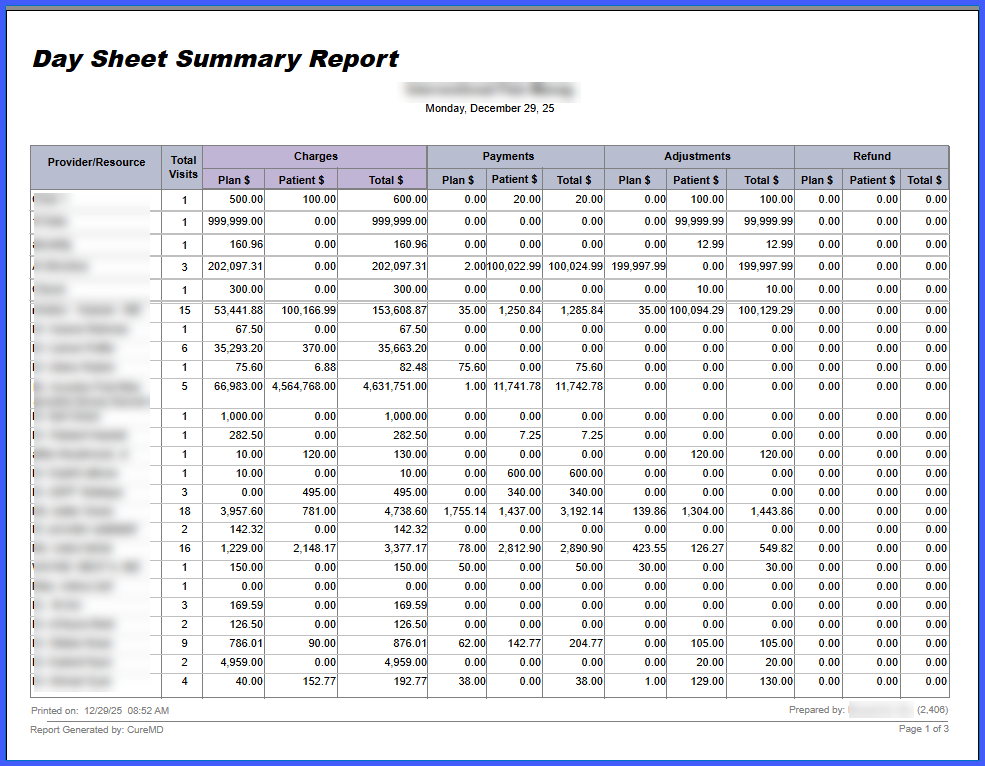
A Total Visits column is displayed in the Day Sheet Summary Report for all grouping options (Plan, Plan Category, Location, Provider/Resource).
-
When grouped by Location or Provider/Resource, the report shows visit totals per entry and a grand total at the bottom of the column.
-
Visit counts reflect system visit records without duplication.
-
All grouping and filter fields now support multi-select using checkboxes.
-
A search box is available within each multi-select dropdown.
- “Select All” and “Clear All” options are available for every multi-select field.
-
Selected values display directly in the field, with indicators such as “+2 more” for longer selections.
-
Filters are summarized at the top of the report after generation.
-
A loading indicator appears during report generation, with an on-screen prompt if a high number of selections may impact performance.
-
The Date field supports individual date selection and preset ranges (Last 7 days, Last 30 days, Current Month).
-
Reports generate even when selected filters return no data, with placeholders indicating no matching records.
-
Export formats, saved configurations, and existing calculation logic remain unchanged.
How It Works
-
Navigate to Reports > Day Sheet Summary.
-
Select a grouping option (Plan, Plan Category, Location, or Provider/Resource).
-
Use the multi-select dropdowns to choose one or more values for any available field.
-
Use the search box, Select All, or Clear All options to refine selections.
-
Choose a date or preset date range.
-
Run the report.
-
Review the Total Visits column, which displays visit counts for each group and a grand total when applicable.
-
Review the applied filters summarized at the top of the report.
-
Export the report if needed; exported output remains unchanged from prior versions.
Benefits
-
Provides consistent visibility into visit volumes regardless of grouping choice.
-
Enables more precise reporting by allowing multiple selections across all filter fields.
- Reduces rework by preserving saved report configurations and export formats.
-
Improves usability with search, bulk selection, and clear filter summaries.
- Maintains accuracy by ensuring visit totals align with existing system data and configuration rules.
