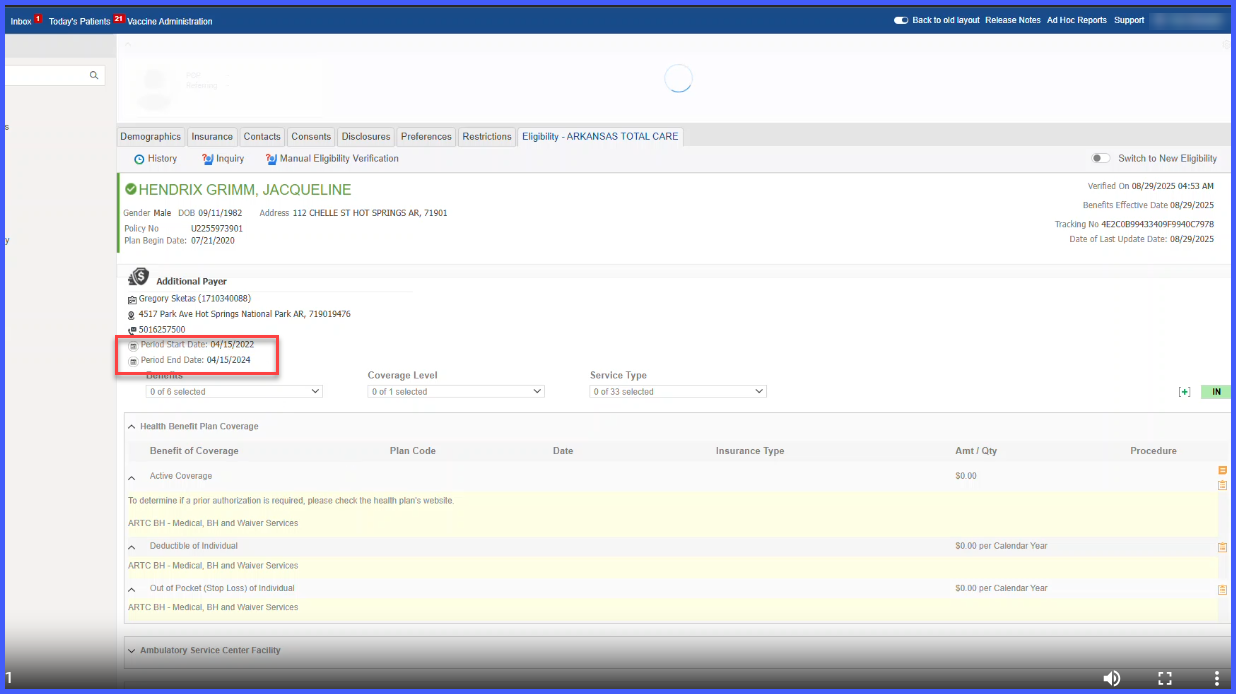
Display PCP Effective Dates at Header Level in Eligibility Screen
What’s New
- Two new fields—PCP Effective From and PCP Effective To—now appear in the Eligibility header under the active PCP’s demographic details.
- Header-level PCP effective dates are synchronized with the active PCP record from the Health Benefit Plan Coverage dataset.
- The header automatically refreshes when new eligibility data is received or when PCP information is manually updated.
- Only the currently active PCP’s date range is displayed.
- No changes are made to backend eligibility retrieval; this enhancement is strictly a UI visibility improvement.
How It Works
- Navigate to Insurance > Eligibility.
- The system identifies the active PCP from the eligibility response.
- The system retrieves PCP Name, NPI, Location, and PCP Effective From/To.
- All PCP details—including effective dates—display together in the header.
- When eligibility is refreshed or PCP data is updated, the header auto-updates to reflect the latest active PCP information.
- Users no longer need to scroll into the Health Benefit Plan Coverage section to confirm PCP validity dates.
Benefits
-
Displays PCP validity dates immediately, reducing verification time.
-
Improves efficiency for front-desk and billing teams working in high-volume environments.
-
Reduces risk of errors by ensuring outdated PCP assignments are not overlooked.
-
Improves usability by consolidating all critical PCP information into a single visible area.
-
Supports accurate claim submission and eligibility decisions through clearer visibility of active PCP details.