Accessing Favorite Procedure Lists in Referral Workflow
What’s New
-
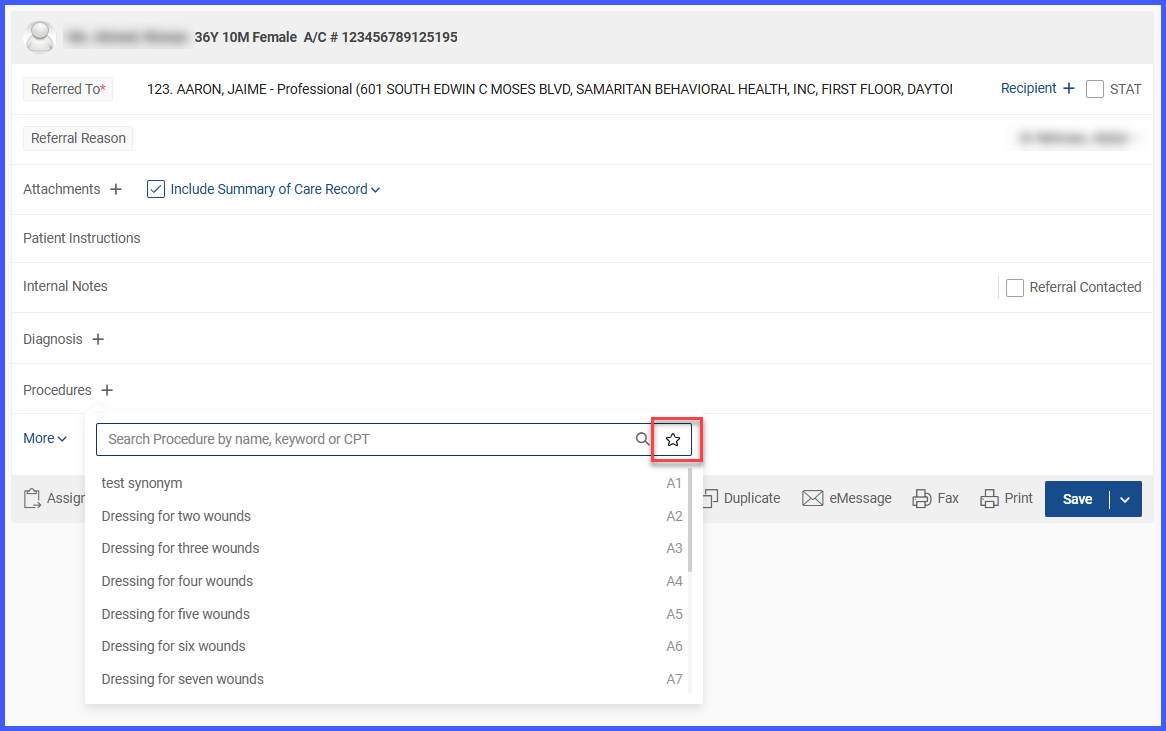
A Star icon is now available in the Procedure Search and Selection dropdown within the referral workflow.
-
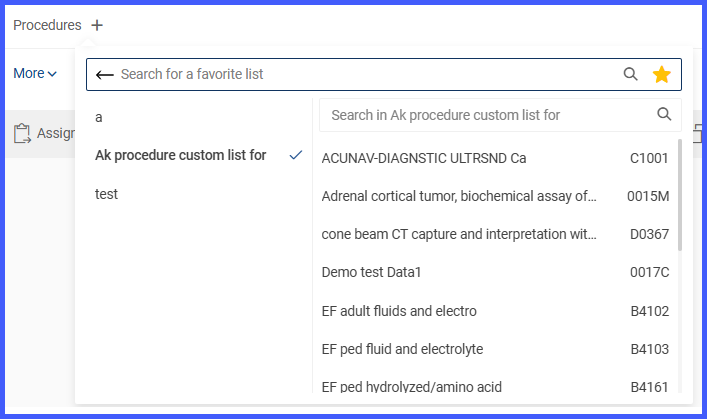
Clicking the Star icon displays the user’s Favorite Procedure Lists.
-
Users can select procedures from their saved favorites and add them directly to the referral.
-
If no favorites exist, the system displays “No Record Found.”
-
Behavior is consistent with how favorites are accessed in other modules.
How It Works
-
Navigate to the Referral component found within the patient module when adding or editing a referral.
-
When entering a new referral, click the Procedure addition (+) icon to open the Procedure Search and Selection dropdown.
-
Select the Star icon within the dropdown to access Favorite Procedure Lists.
-
Choose a procedure from the favorites list to add it to the referral.
-
If no favorites are available, the system shows “No Record Found.”
Benefits
-
Reduces the time spent searching for commonly used procedures.
-
Provides consistent access to favorite lists across modules.
-
Improves workflow efficiency when adding procedures to referrals.