Display of Lot Number and Expiry Date in Medication Logs and SOAP Text
What’s New
-
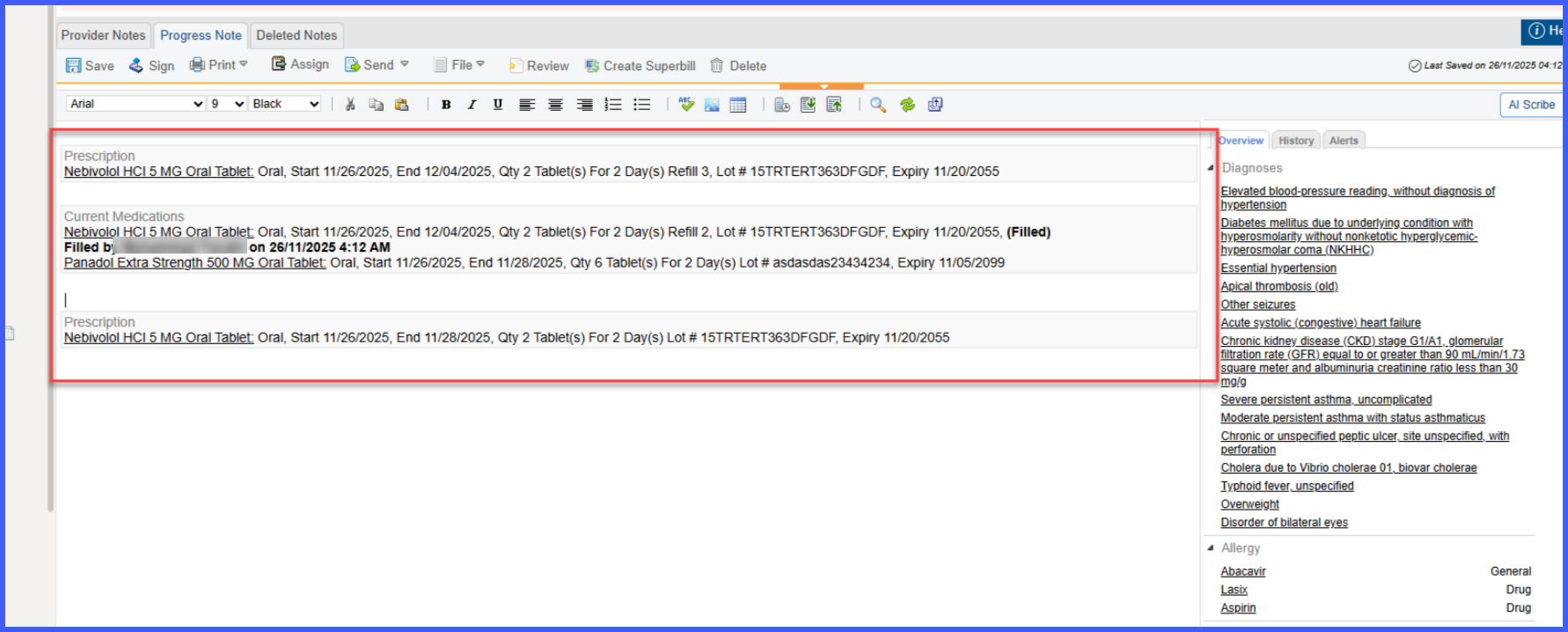
Lot Number and Expiry Date now display in SOAP text immediately after the Refills field when prescribing inventory medications.
-
These fields appear for any inventory medication containing Lot Number and Expiry Date sourced from Flexscan.
-
Display occurs regardless of whether the medication is prescribed, administered, or dispensed.
-
Medication Logs now show Lot Number and Expiry Date alongside medication instructions for inventory-based medications.
-
Applies only to medications entered through the inventory workflow with available lot details.
How It Works
-
From a Provider Note, open the prescriptions section.
-
Select and prescribe an inventory medication that includes Lot Number and Expiry Date from Flexscan.
-
After prescribing, the SOAP text automatically displays Lot Number and Expiry Date after the Refills count.
- In Medication Logs, inventory medications containing lot details display Lot Number and Expiry Date next to the medication instructions.
Benefits
-
Enhances traceability of inventory medications across clinical documentation.
-
Improves audit readiness by surfacing lot information wherever medications are recorded.
-
Ensures consistent visibility of safety-critical details in both SOAP text and medication logs.