Manage Who Can View Provider Calendars
What’s New
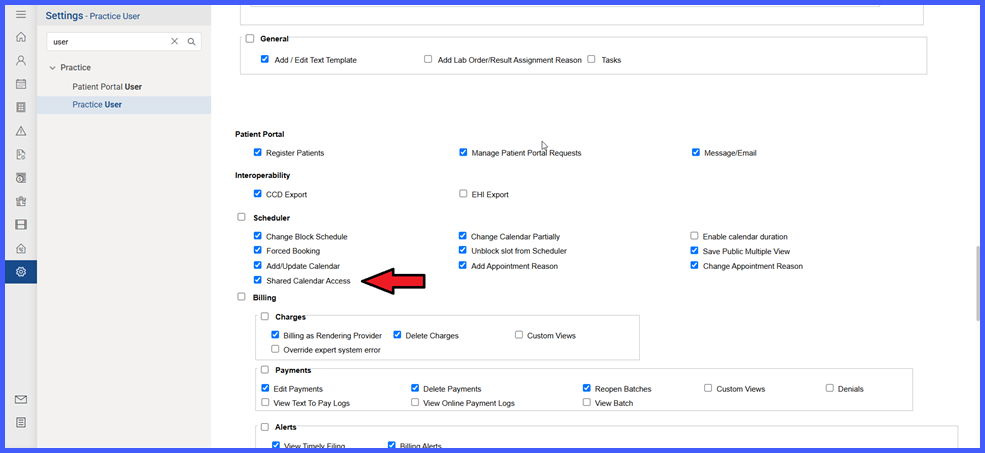
A new ‘Shared Calendar Access’ permission has been added to user profiles under Settings > Practice User > User Profile > User > Permissions.
-
When enabled, users can view all provider calendars across their assigned location(s).
-
When disabled, users can only view provider calendars linked to them in the Provider dropdown of their user profile.
-
Resource calendars remain visible to users regardless of this permission.
-
Default configuration keeps Shared Calendar Access enabled for all users to preserve existing workflows.
How It Works
-
Navigate to User Permissions and locate the Shared Calendar Access option.
-
Enable or disable the permission based on access requirements:
-
Enabled: User can view all provider calendars within assigned location(s).
-
Disabled: User can view only linked provider calendars.
-
-
Access control is consistently enforced across:
-
Manage Reason Groups
-
Future Appointments
-
Search, Reschedule, and Follow-up Appointments
-
Today, Patient
-
Move/Edit/Add Chain
-
Appointment Status
-
Quick Schedule Appointment
-
CureConfirm Status
-
Vaccine Administration
-
-
The Audit Trail captures changes when this permission is enabled or disabled.
Benefits
-
Enhances security by limiting unnecessary calendar visibility.
-
Allows flexible configuration aligned with operational roles.
-
Ensures consistent access behavior across scheduling modules.
-
Maintains workflow continuity through default enabled settings.
-
Provides audit traceability for all permission changes.