Updated Date Picker Validation in Provider Note Sign Off
What’s New
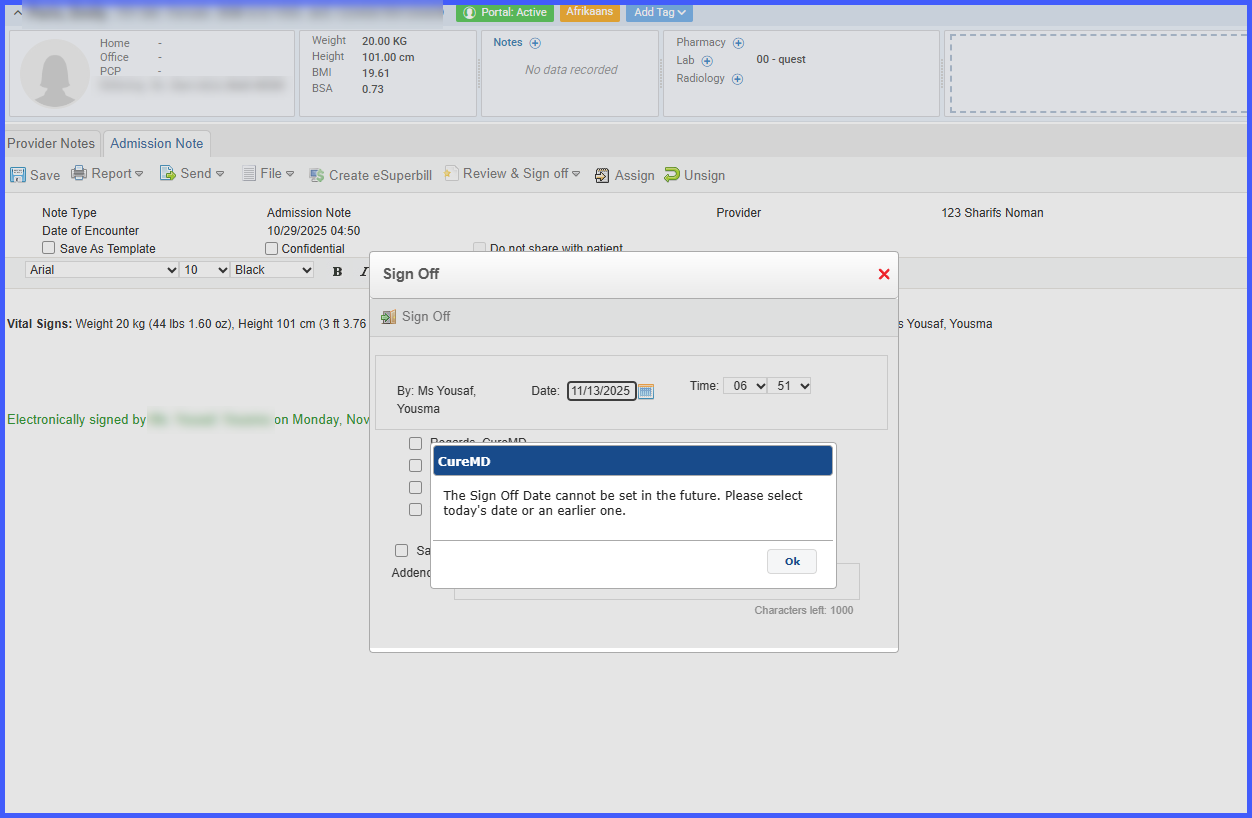
The Sign Off date picker now enforces a maximum selectable date of today, respecting the practice’s local timezone. Attempts to manually type, paste, or set a future date through any method are blocked, with an error message displayed:
“The Sign Off Date cannot be set in the future. Please select today’s date or an earlier one.”
The existing rule preventing selection of a date earlier than the original note signing date remains in place. The time picker remains unrestricted for the selected date.
How It Works
-
Open a Provider Note and navigate to the Sign Off section.
-
The date picker restricts selectable dates to today or earlier based on the practice’s local timezone.
-
Any attempt to select a future date manually or via indirect methods triggers an error message.
-
The time picker remains fully selectable for the chosen date.
-
Once a valid date (today or after the original signing date) and time are selected, clicking Sign Off saves the note successfully.
Benefits
-
Prevents invalid future dates in clinical documentation.
-
Ensures Sign Off dates are accurate and compliant with practice standards.
-
Maintains flexibility by allowing unrestricted time selection within the chosen date.
-
Preserves existing rules for minimum date selection to maintain data integrity.