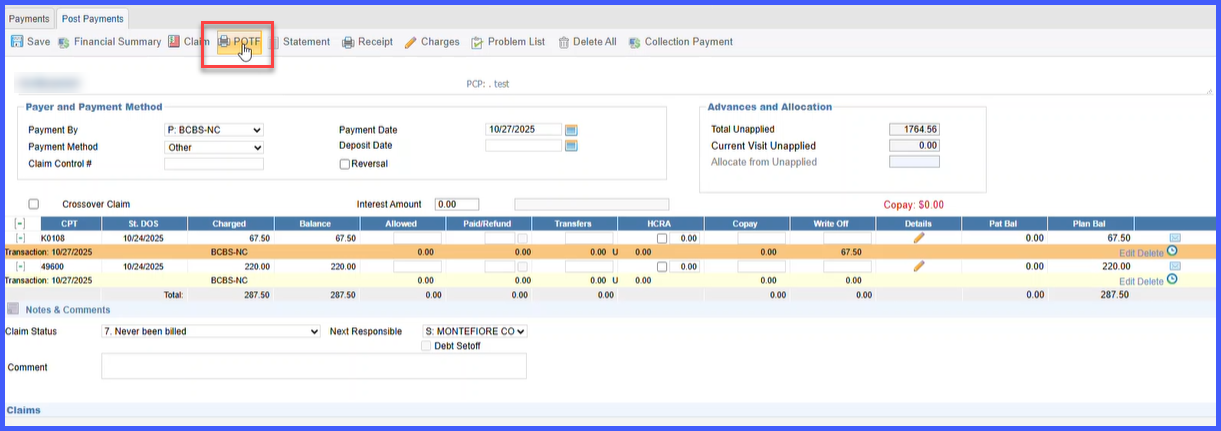
Generate Proof of Timely Filing (POTF) from Payment Screen for Denied or Rejected Claims
What’s New
-
Added a Generate POTF option under Patient → Billing → Payment → Add/Edit Payment.
-
POTF can now be generated for:
-
Claims denied with Reason Code 29 (Timely Filing).
-
Claims rejected for timely filing without a denial or EOB.
-
-
POTF generation uses data from existing system sources, including:
-
Claim details
-
Patient demographics
-
Payer information
-
Submission logs
-
-
The option is available only for claims that have been submitted at least once (electronically or on paper).
-
Generated POTF files are ready for download/print and can be attached to paper claim submissions.
-
All POTF generation activities are logged for audit and compliance tracking.
How It Works
-
Navigate to Patient → Billing → Payment → Add/Edit Payment.
-
Open the payment record for a claim that has been submitted at least once.
-
Click the Generate POTF option.
-
The system retrieves information from the claim, patient demographics, payer record, and submission logs.
-
A Proof of Timely Filing (POTF) document is generated automatically.
-
Download or print the POTF and attach it to the resubmitted paper claim for mailing.
-
The generation action is automatically recorded in the audit log with the username, date, and time.
Benefits
-
Enables faster turnaround for claims rejected due to timely filing.
-
Allows POTF generation without requiring a denial or EOB.
-
Reduces manual documentation effort by auto-populating data from claim records.
-
Improves payer compliance and reduces delays in claim resubmission.