Warning Confirmation When Unsinging Notes with Addendums
What’s New
- The user opens a signed clinical note that contains one or more addendums.
- Upon clicking the “Unsign” button, the system displays a confirmation dialog with the following message: “Are you sure you want to unsign this note? This will permanently delete all addendums and sign-offs.”
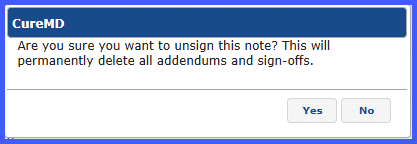
- The modal provides two options: Yes and No. If the user clicks Yes, the system deletes all related addendums and sign-offs, changes the note status to “Unsigned,” refreshes the UI to reflect the update, and logs the action in the audit trail. If the user clicks No, the action is canceled, and the user is returned to the previous state without any data loss.
Note: This confirmation dialog is displayed only if the selected note contains addendums or sign-offs. If none are present, the system proceeds with the unsign action without prompting the user.
Why it Helps
- Prevents data loss — explicit warning before irreversible action.
- Ensures compliance — confirms awareness of deleting addendums/sign-offs.
- Clear accountability — action recorded in the audit trail.
