Display Provider & Location in Text-to-Pay e-Statements
What’s New
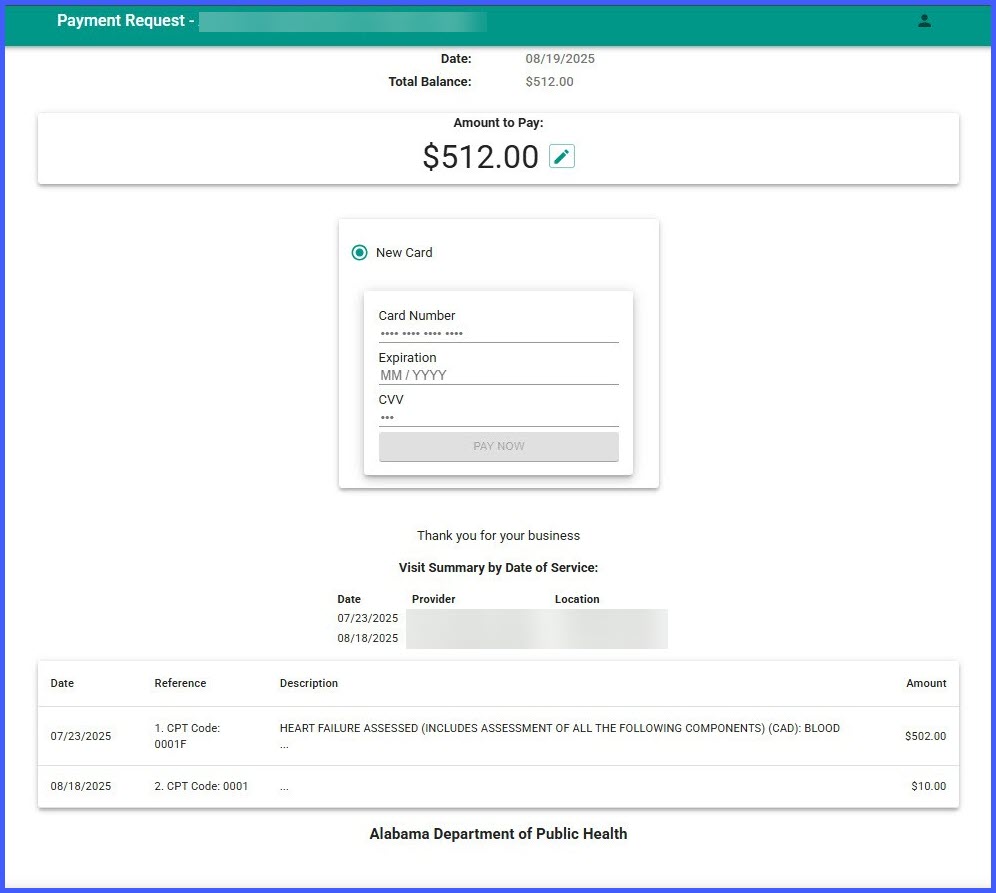
To help patients more easily recognize and verify their charges, Text-to-Pay e-statements now include a “Visit Summary by Date of Service” section. This summary lists the provider and location for each date of service, making the statement clearer and reducing support inquiries.
Because the third-party vendor’s e-statement template does not allow structural changes, this summary is added as plain text directly beneath the “Thank you for your business!” message—within the vendor’s existing open text area.
No action is required to enable this enhancement; it is automatically included in all newly generated Text-to-Pay statements.
How It Works
When a Text-to-Pay e-statement is generated:
-
The system appends a plain-text summary block under the “Thank you for your business!” line.
-
The summary is titled “Visit Summary by Date of Service:”
-
Each line in the summary includes:
-
Date: MM/DD/YYYY
-
Provider: Full provider name (as configured)
-
Location: Facility name, and address if space permits
-
Multiple rows are added when provider or location changes across dates of service.
If any field is unavailable, it is shown as “Not Available.”
Benefits
-
Helps patients understand who provided care and where
-
Reduces billing confusion and support questions
-
Improves confidence and likelihood of completing payments
-
No changes required to your current Text-to-Pay setup