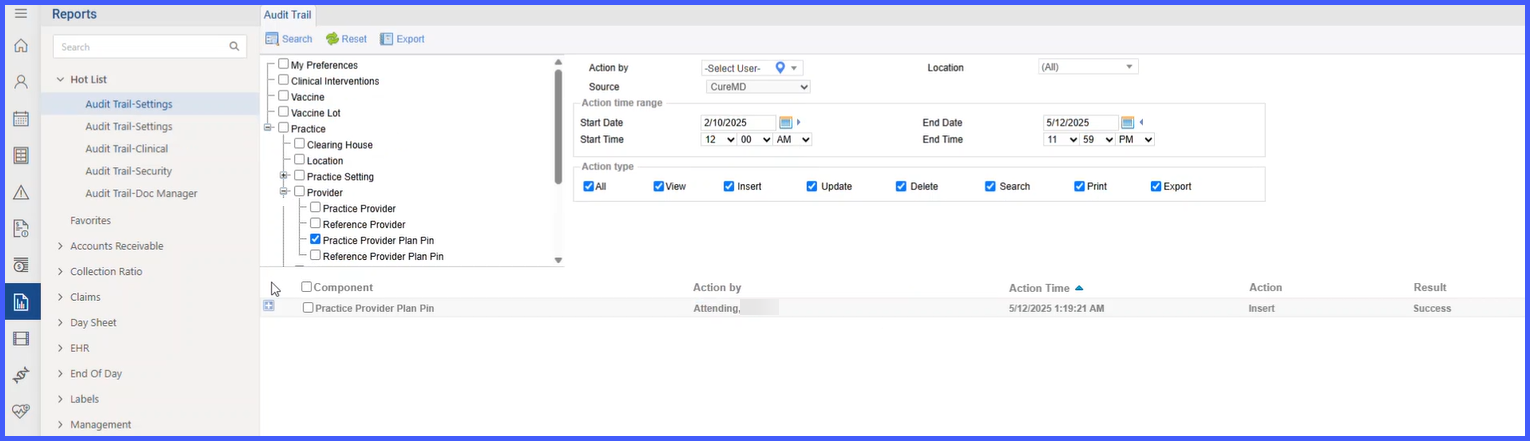
Provider Pin Audit Trail
What’s New
Functionality Overview
- Coverage:
- Settings → Practice → Provider → Practice Provider → Provider Plan PIN
- Settings → Practice → Provider → Reference Provider → Provider Plan PIN
- Report Highlights:
- Displays entries for add, edit, and delete actions on Provider Plan PIN records.
- Shows When (timestamp) and Who (user) made the change, along with the Provider and Plan context.
- Supports printing/exporting like other audit reports (per your standard report options).
- Benefits:
- Improves transparency and accountability.
- Makes compliance reviews faster and simpler.
If you need help locating the report or setting filters, contact your system administrator.
Workflow
- Where to find it:
Reports → Miscellaneous → Audit Trail → Settings → Practice → Provider- Practice Provider Plan PIN
- Referring Provider Plan PIN
- What it shows:
A list of PIN-related updates for providers, including the date/time and user who performed the change.