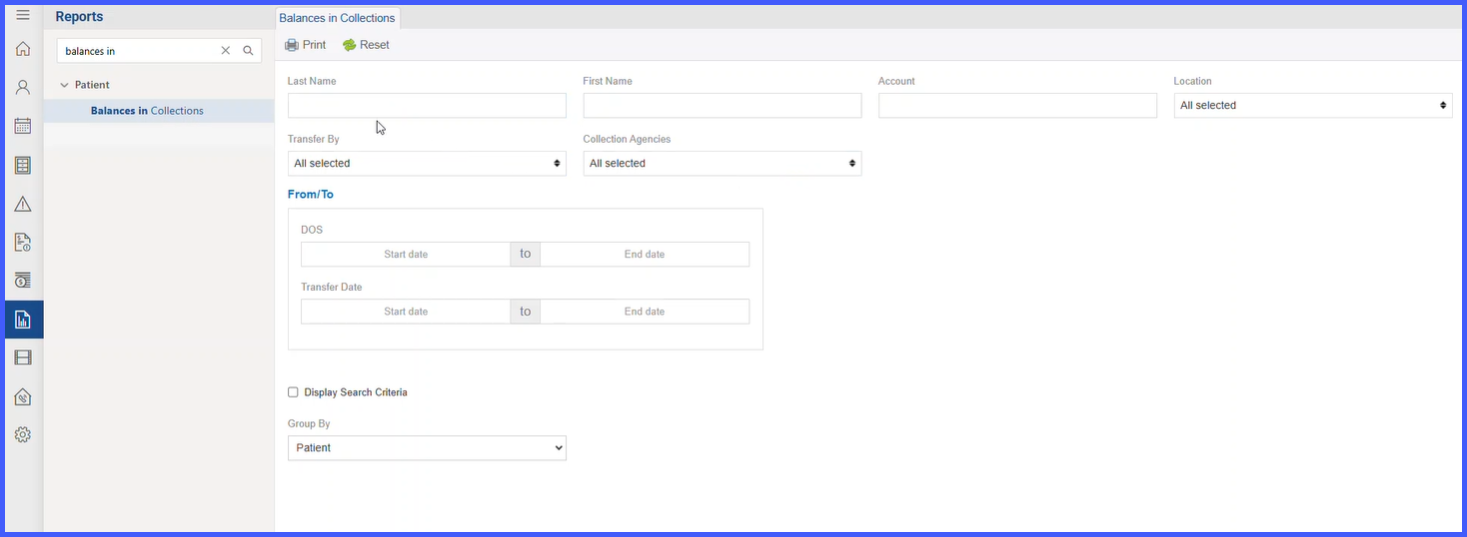
Balances in Collection Report
Functionality Overview
Availability & Permissions
- The report appears only when the practice setting “Transfer Patient Balances to Agencies” is enabled.
- User/Role permissions govern visibility and access to the report.
Grouping & Totals
- Group By options: Patient, Location, Agency, Transfer Date.
- Default Group By: None.
- When grouped by Agency, a Totals table for each agency appears at the end of the report.
- A final Summary table is appended with two columns: Agency Name and Amount ($) (grand totals by agency).
“Display Search Criteria” Behavior
- A checkbox “Display search criteria” allows including selected filter parameters in the printed output.
- When checked:
- Transfer By criterion is not displayed in the header.
- Collection Agencies (from filter) are displayed in the report header.
Usability & Output
- Results are presented in a print-friendly layout for easy sharing.
- Empty-state messaging is shown when no records match the selected filters.
Data Handling Notes
- Amount ($) reflects the balance transferred to the agency for the listed appointment.
- Transfer Date and Transfer By are sourced from the collections transfer event.
- Agency Name is pulled from the configured collection agency master list.
Columns shown
- Account Number
- Patient
- Appointment
- Provider/Resource
- Location
- Transfer Date
- Transfer By
- Agency Name
- Amount ($)
Filters available
- First Name, Last Name
- Account No
- Location
- Transfer By (list of practice users)
- Agency Name (list of all collection agencies)
- Date Range (both DOS and Transfer Date)