Mandatory Diagnosis Enforcement for Controlled Substance ePrescriptions
What’s New
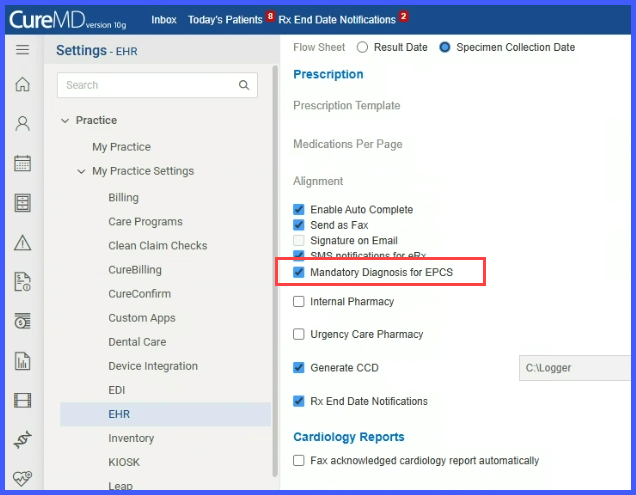
A checkbox labeled “Mandatory Diagnosis for EPCS” is available under Settings > My Practice Settings › EHR › Prescription Section, which remains disabled by default. Users with ePrescription and EPCS enabled at practice level can check this box to activate diagnosis enforcement when prescribing controlled substances electronically.
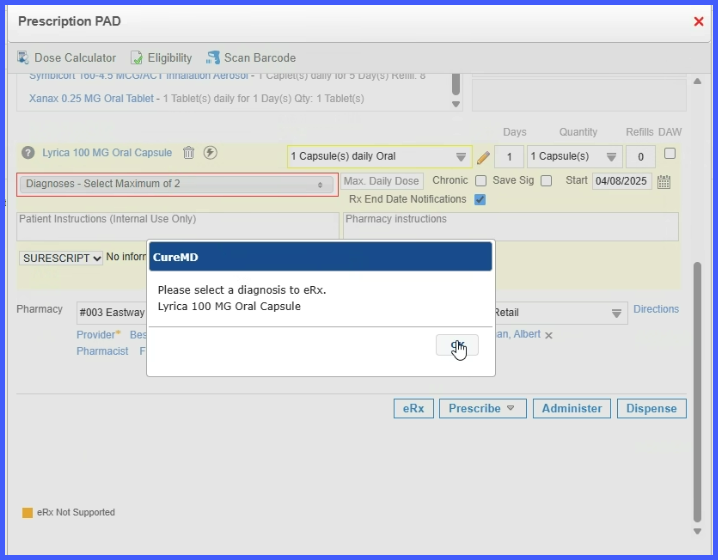
Once activated, whenever a provider attempts to electronically prescribe Schedule I–V medications without selecting a diagnosis, the diagnosis dropdown highlights in red, and an error message stating “Please select a diagnosis to eRx” appears, blocking prescription submission. After the user selects a valid diagnosis, the error prompt disappears, and the red outline around the diagnosis dropdown clears automatically, allowing prescription submission.
This enforcement applies specifically to workflows involving patient chart medication lists, provider notes prescriptions, prescription draft workflows, Rx end date notifications, and refills or replacements involving controlled substances.