Optional Report Filters to Improve E‑Superbills Bulk Download Performance
What’s New
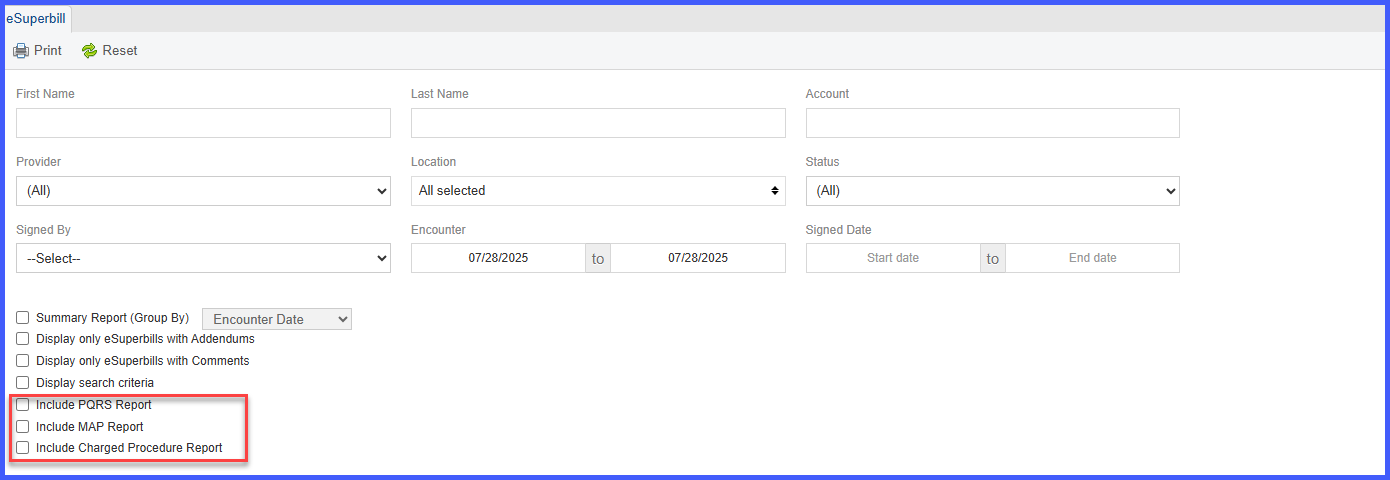
Three new checkboxes have been added to the E‑Superbill search criteria panel:
- Include PQRS Report
- Include MAP Report
- Include Charged Procedure Report
These options are unchecked by default to ensure optimal performance.
How It Works
- When none of the new checkboxes are selected:
- The system generates the E‑Superbills using core data only.
- This results in faster response times, especially for larger date ranges.
- When one or more checkboxes are selected:
- The report includes the corresponding report sections (PQRS, MAP, Charged Procedures).
- May increase data load and processing time based on volume.
Benefits
- Improved Performance: Prevents timeout errors by limiting data load by default.
- Modular Data Inclusion: Gives users full control over what additional data to include.
- Optimized for Billing Staff: Allows bulk report generation for wider date ranges without system failure.
- Efficient Historical Reporting: Reduces wait times for reports with extended timeframes.
User Guidance
- To extract only core superbill data: Leave all three checkboxes unchecked (default).
- To include additional reports: Check the respective boxes before running the report.
- For large date ranges (e.g., a week or more), we recommend starting with only the core data to verify performance.
