CMS155v12 – Weight Assessment and Counseling for Nutrition and Physical Activity for Children and Adolescents

Weight Assessment and Counseling for Nutrition and Physical Activity for Children and Adolescents CMS155v12 Percentage of patients 3-17 years of age who had an outpatient visit with a primary care physician (PCP) or obstetrician/gynecologist (OB/GYN) and who had evidence of the following during the measurement period.
  • Percentage of patients with height, weight, and body mass index (BMI) percentile documentation
  • Percentage of patients with counseling for nutrition
  • Percentage of patients with counseling for physical activity
– DENOMINATOR

Patients 3-17 years of age by the end of the measurement period, with at least one outpatient visit with a primary care physician (PCP) or an obstetrician/gynecologist (OB/GYN) during the measurement period.

An outpatient visit in this case can include any of the following:

  • Office Visit
  • Preventive Care Services Individual Counseling
  • Preventive Care, Established Office Visit, 0 to 17
  • Preventive Care Services, Initial Office Visit, 0 to 17
  • Preventive Care Services Group Counseling
  • Home Healthcare Services
  • Telephone Visits
– NUMERATOR – 1
Patients who had a height, weight and body mass index (BMI) percentile recorded during the measurement period.
– NUMERATOR –  2
Patients who had counseling for nutrition during the measurement period.
– NUMERATOR – 3
Patients who had counseling for physical activity during the measurement period.
– DENOMINATOR EXCLUSIONS
  • Patients who have a diagnosis of pregnancy during the measurement period.
  • Patients who are in hospice care for any part of the measurement period.
– APPLICATION WORKFLOW

For Denominator:

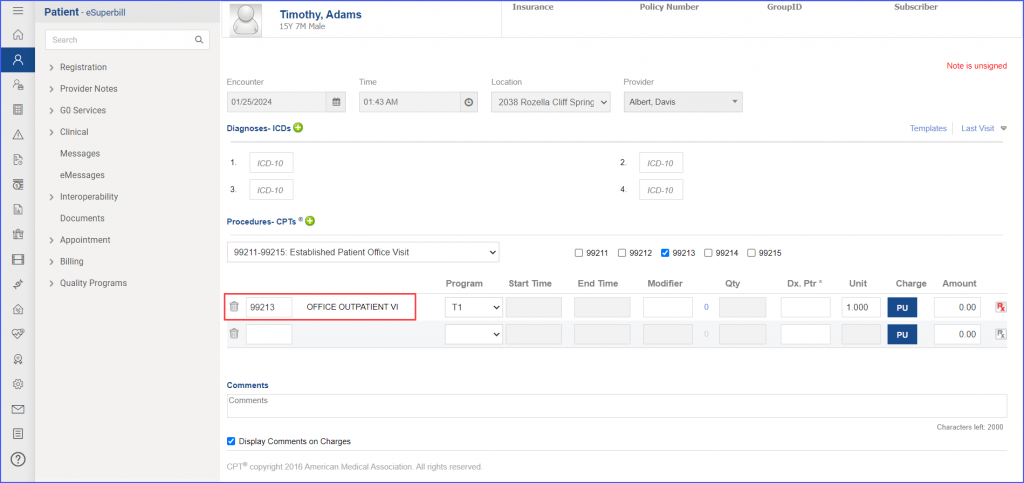
To record an encounter, navigate to Patient > Provider Note > Create Superbill. Under the ‘Procedure- CPTs’ heading, enter the relevant encounter code.
155v12-1-1024x483
eSuperbill for Encounter

For Numerator 1:

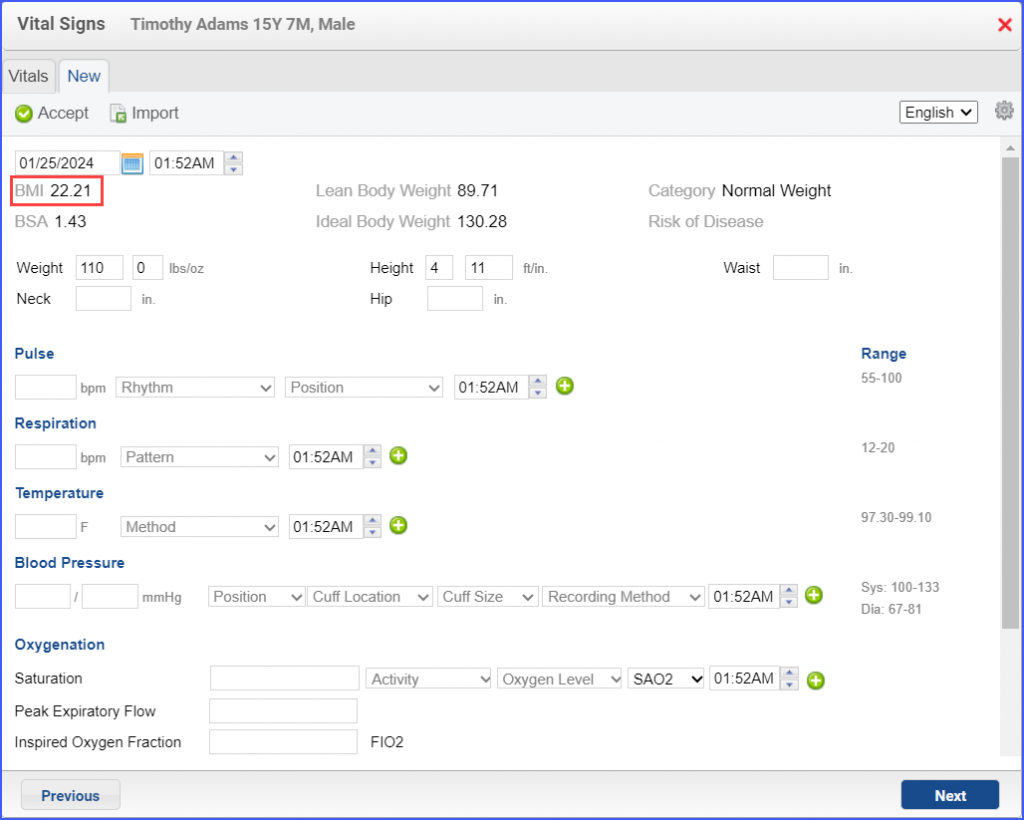
Vitals can be recorded through Patient > Provider Note > Vitals. Here, click on ‘Add’ and enter the ‘Weight’ and ‘Height’ of the patient in the respective fields. The system automatically calculates the BMI. Once done, click ‘Accept’.
155v12-2-1024x820
BMI Automatically Calculated using Weight and Height

For Numerator 2 & 3:

To record an intervention, navigate to Patient > Provider Note > Evaluations. Click ‘Add’ and search for a counseling intervention. Select ‘Performed’ from the ‘Status’ drop-down and then click ‘Save & Accept’ or ‘Sign & Accept’. Following codes may be used:
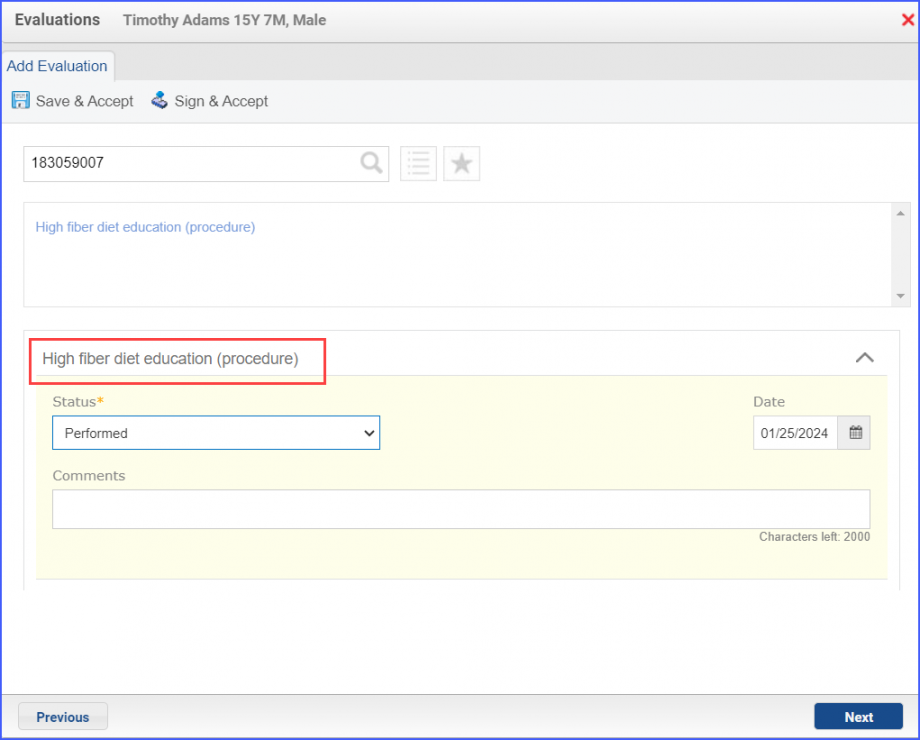
  • 183059007
  • 183060002
  • 183061003
  • 103736005
  • 183073003
  • 281090004
155v12-3-920x740
Example of Counseling for Nutrition Intervention

For Denominator Exclusions:

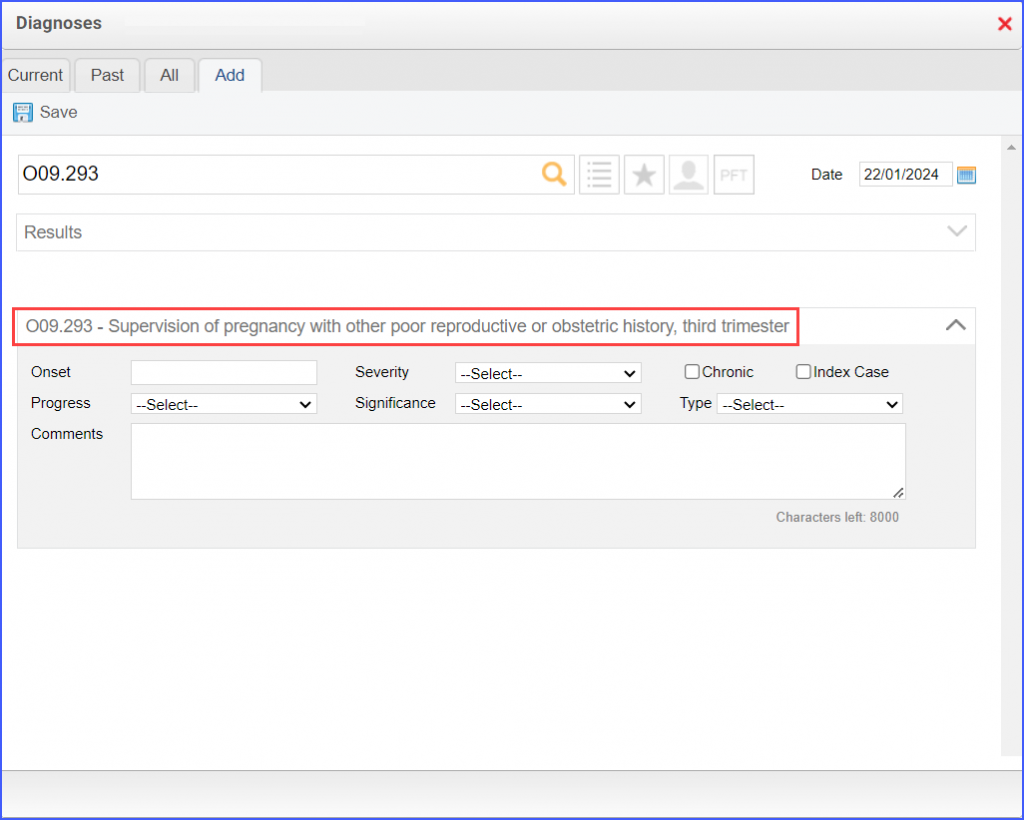
  • The pregnancy diagnosis can be documented via Patient > Provider Note > Diagnoses. Click ‘Add’ and search for the relevant diagnosis. Fill out the diagnosis details and once done click ‘Save’. Then click ‘Accept’ to add the diagnosis to the provider note.
155v12-4-1024x820
Example of Pregnancy Diagnosis
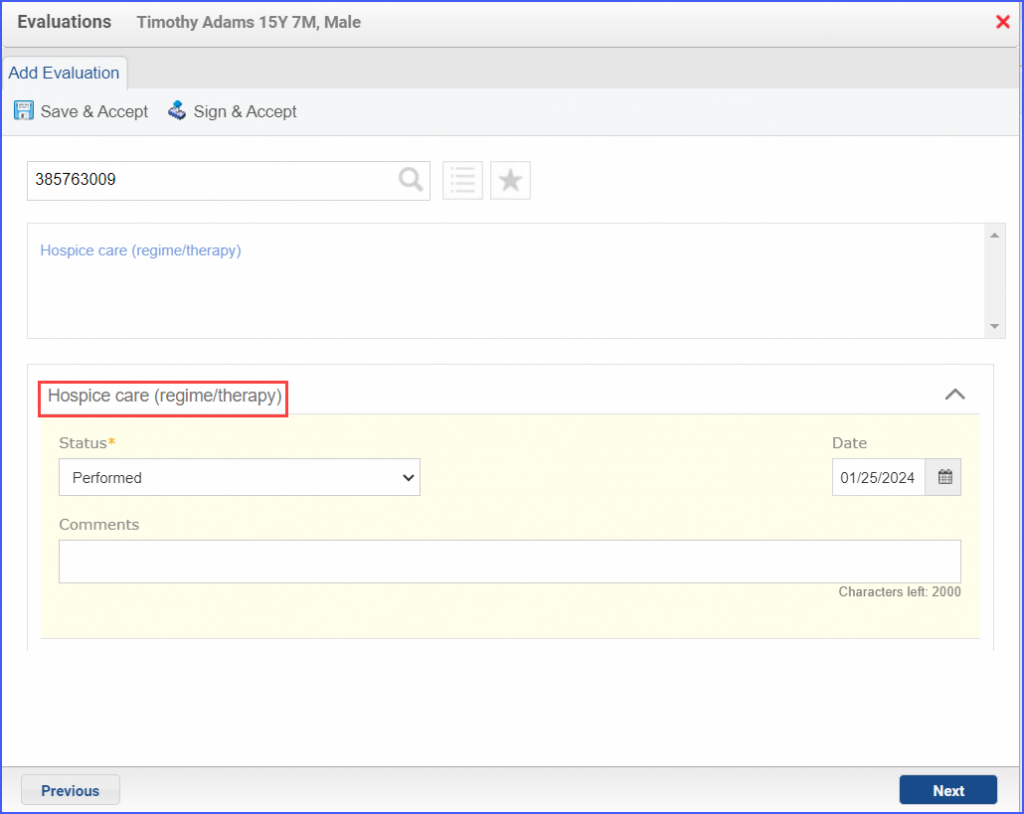
  • To document that a patient is receiving hospice care outside of a hospital or long-term care facility, navigate to Patient > Provider Note > Evaluations. Use the below mentioned codes to order or perform an intervention:
    • 385763009: Hospice Care (Regime/Therapy)
    • 385765002: Hospice Care Management (Procedure)
155v12-5-1024x814
Hospice Care Intervention
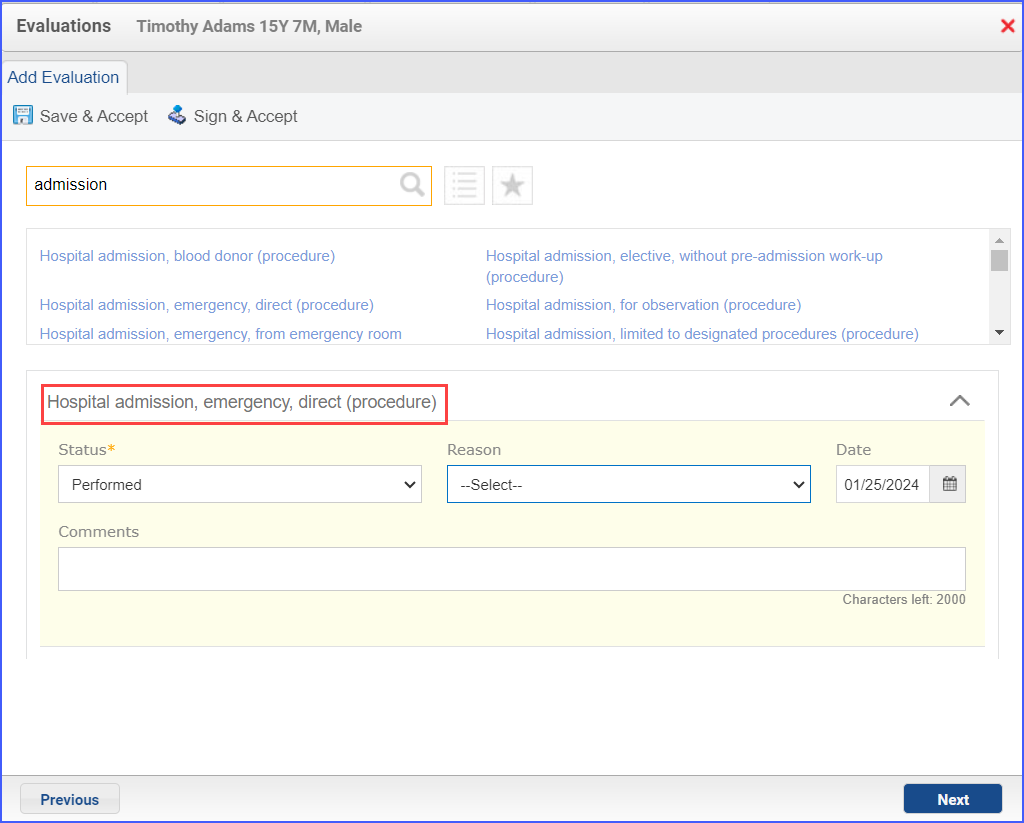
  • To document an inpatient encounter, navigate to Patient > Provider Note > Evaluations.
155v12-6-1024x823
Example of Inpatient Encounter
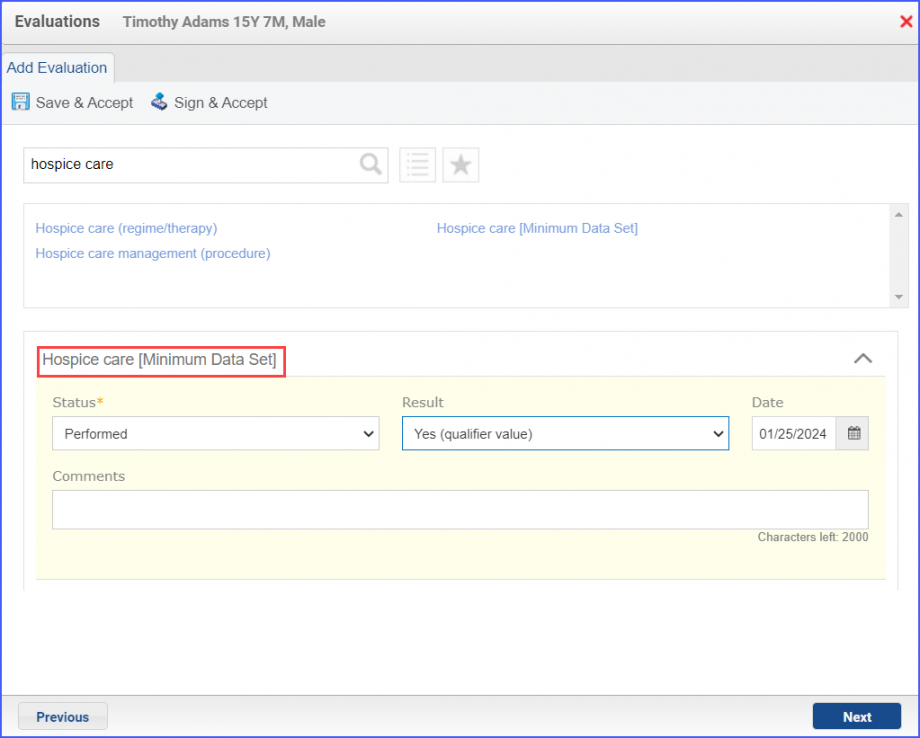
  • To document a hospice care assessment, follow the workflow Patient > Provider Note > Evaluations. Click ‘Add’ and search for ‘Hospice Care [Minimum Data Set]’. Then select ‘Performed’ from the ‘Status’ dropdown and ‘Yes’ from the ‘Result’ field.
155v12-7-920x738
Hospice Care Assessment
  • A hospice encounter can be documented through Patient > Provider Note > Evaluations or Patient > Provider Note > Create Superbill.