How to Delete Provider Note?
\user can delete a provider note added for the patient. Following the workflow, select the desired provider note from the list. Locate the ‘Delete’ button in the action bar.
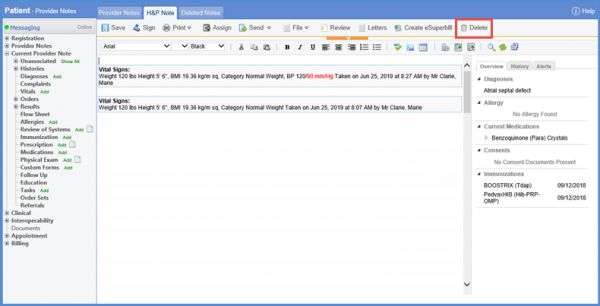
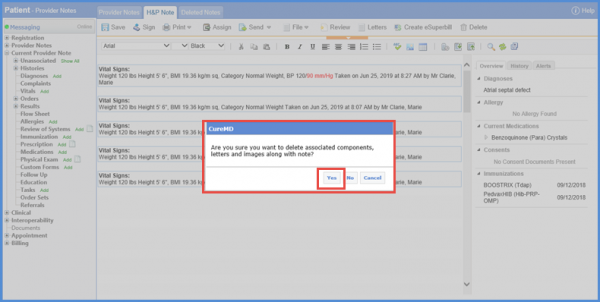
Clicking the Delete button, a confirmation prompt can be seen on the screen. Click ‘Yes’ to delete the note.
User can view the deleted provider notes in the ‘Deleted Notes’ tab.
If the Provider Note is associated for a cancer patient, it’s a chemo administration note. A Chemo Administration Note cannot be deleted if a Chemo Administration Record (Signed or Unsigned) is attached to the note. As the user clicks the delete button to delete the provider note, user can see an alert on the screen. The alert message notifies the user to delete the associated chemo administration first in order to delete the provider note.
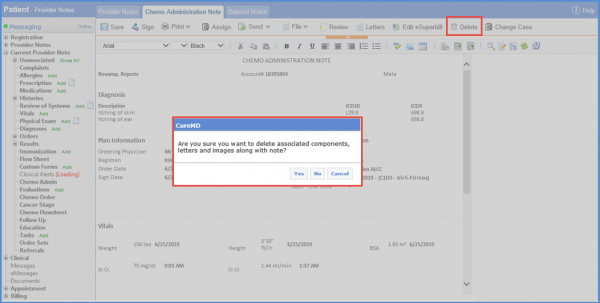
In order to delete this note, user has to delete the Chemo Administration Record first.
