How to Save Billing Entity on Charge Based on Responsible Plan?
User can save billing entities of all the selected plans at charge level.
To do this, follow the above mentioned workflow and land on “Add/Edit Charge” page.
Here, if primary and secondary plans exist for that patient, user can select primary billing entity or secondary billing entity from their respective drop-downs.
In case the specific plan does not exist, system hides respective drop-down.
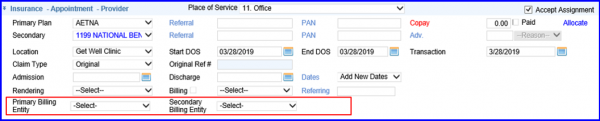
If single billing entity exists for both plans, they are auto populated in their respective drop-downs.
For multiple billing entities, user can select between multiple options shown in their respective drop-downs.
